
CI/CD for AI Systems: GitHub Actions, ECR, and GPU Deployments on AWS
Your RAG system runs flawlessly on your local machine. The answers are precise, retrieval quality is on point, inference is fast enough. Then comes the deployment. The container takes two minutes to start because the embedding model needs to be loaded into GPU memory. The health check fails because it gives up after 30 seconds. The load balancer routes traffic to a container that is not yet ready. Rollback.
GPU-based AI systems break the assumptions that standard CI/CD pipelines are built on. Containers don't start in seconds but in minutes. Images aren't 200 MB but 2 to 8 GB. A failed deployment doesn't just mean downtime but potentially lost GPU compute time billed by the hour.
In this article, I present a production-ready pipeline for GPU-based AI systems on AWS. From OIDC authentication to ECR lifecycle policies to ECS rolling deployments with circuit breaker. Every decision is justified, every trade-off named. If you already have experience with RAG systems in production, this article bridges the gap between a working system and reliable deployment.
Why CI/CD for AI Systems Is Different
Before diving into the implementation, it's worth looking at the fundamental differences. This table summarizes why standard pipelines fail with GPU workloads:
| Aspect | Standard App | GPU/AI System |
|---|---|---|
| Container Start | 2 to 5 seconds | 60 to 120 seconds |
| Health Check | HTTP 200 after 3s | GPU + model loaded after 90s |
| Image Size | 100 to 300 MB | 2 to 8 GB |
| Worker Scaling | Horizontal (N workers) | 1 worker per GPU (VRAM limit) |
| Rollback Risk | Seconds of downtime | Minutes of GPU costs |
| Scaling | More workers per container | More containers (horizontal) |
These differences directly affect every component of the pipeline: health check timeouts must be adjusted, the load balancer needs a warm-up phase, and the circuit breaker must understand that a long startup is not a failure.
OIDC: No Stored Credentials
The first decision concerns authentication. Many teams use long-lived AWS access keys in GitHub Secrets. This works but poses a security risk: the keys don't rotate automatically, often have overly broad permissions, and must be managed manually.
The alternative is OIDC (OpenID Connect). GitHub Actions authenticates directly with AWS using short-lived JWT tokens. No stored credentials, no rotation, no manual management. The token is only valid for the duration of the workflow run.
Terraform Setup
# OIDC Provider: GitHub als Identity Provider registrieren
resource "aws_iam_openid_connect_provider" "github" {
  url = "https://token.actions.githubusercontent.com"

  client_id_list = ["sts.amazonaws.com"]

  thumbprint_list = [
    "6938fd4d98bab03faadb97b34396831e3780aea1",
    "1c58a3a8518e8759bf075b76b750d4f2df264fcd"
  ]
}

# IAM-Rolle, die GitHub Actions annehmen darf
resource "aws_iam_role" "github_actions" {
  name = "github-actions-deploy"

  assume_role_policy = jsonencode({
    Version = "2012-10-17"
    Statement = [
      {
        Effect = "Allow"
        Principal = {
          Federated = aws_iam_openid_connect_provider.github.arn
        }
        Action = "sts:AssumeRoleWithWebIdentity"
        Condition = {
          StringEquals = {
            "token.actions.githubusercontent.com:aud" = "sts.amazonaws.com"
          }
          StringLike = {
            "token.actions.githubusercontent.com:sub" = "repo:your-org/your-repo:ref:refs/heads/main"
          }
        }
      }
    ]
  })
}
Least-Privilege Permissions
The Condition on the main branch is critical. Without this restriction, any branch, any pull request, and any fork could deploy to your AWS account. In a team with multiple developers, this is an attack vector that is easily overlooked.
# Nur die minimal nötigen Berechtigungen
resource "aws_iam_role_policy" "deploy" {
  name = "deploy-policy"
  role = aws_iam_role.github_actions.id

  policy = jsonencode({
    Version = "2012-10-17"
    Statement = [
      {
        Sid    = "ECRAuth"
        Effect = "Allow"
        Action = ["ecr:GetAuthorizationToken"]
        Resource = "*"
      },
      {
        Sid    = "ECRPush"
        Effect = "Allow"
        Action = [
          "ecr:BatchCheckLayerAvailability",
          "ecr:InitiateLayerUpload",
          "ecr:UploadLayerPart",
          "ecr:CompleteLayerUpload",
          "ecr:PutImage"
        ]
        Resource = aws_ecr_repository.ki_api.arn
      },
      {
        Sid    = "ECSUpdate"
        Effect = "Allow"
        Action = [
          "ecs:UpdateService",
          "ecs:DescribeServices",
          "ecs:RegisterTaskDefinition",
          "ecs:DescribeTaskDefinition"
        ]
        Resource = "*"
        Condition = {
          StringEquals = {
            "ecs:cluster" = aws_ecs_cluster.ki_cluster.arn
          }
        }
      },
      {
        Sid    = "PassRole"
        Effect = "Allow"
        Action = ["iam:PassRole"]
        Resource = [
          aws_iam_role.ecs_task_role.arn,
          aws_iam_role.ecs_execution_role.arn
        ]
      }
    ]
  })
}
The difference compared to Action = ["ecr:*", "ecs:*"] is significant. The policy above allows exactly four actions: ECR login, image push, ECS service update, and passing the task roles. No deleting repositories, no access to other clusters, no manipulation of IAM roles.
Dockerfile for GPU Workloads
FROM python:3.11-slim

WORKDIR /app

# System-Dependencies für ML-Libraries
RUN apt-get update && apt-get install -y --no-install-recommends \
    build-essential \
    && rm -rf /var/lib/apt/lists/*

# Dependencies zuerst (Docker Layer Cache)
COPY requirements.txt .
RUN pip install --no-cache-dir -r requirements.txt

# Application Code
COPY . .

# Gunicorn mit GPU-optimierten Parametern
CMD ["gunicorn", "app:create_app()", \
     "--bind", "0.0.0.0:8000", \
     "--workers", "1", \
     "--timeout", "120", \
     "--max-requests", "1000", \
     "--max-requests-jitter", "50"]
Why These Parameters?
| Parameter | Value | Rationale |
|---|---|---|
| workers | 1 | A single GPU model occupies all available VRAM. Two workers would require double the memory, which a single GPU doesn't have. Horizontal scaling is done via ECS (more containers), not more workers. |
| timeout | 120 | RAG queries with retrieval, reranking, and generation can take up to 30 seconds for complex documents. With a safety buffer: 120 seconds. |
| max-requests | 1000 | After 1000 requests, the worker is restarted. This prevents memory fragmentation that occurs in long-lived Python processes with ML libraries. PyTorch and Transformers don't always cleanly allocate and deallocate GPU memory. |
| max-requests-jitter | 50 | Prevents all workers from restarting simultaneously when multiple containers are running. |
Why python:3.11-slim instead of a CUDA base image? CUDA images are 4 to 6 GB in size. When GPU drivers are installed on the host (which is the case with ECS GPU instances), a slim Python image is sufficient. The CUDA runtime is passed through from the host via the --gpus flag at container start. This significantly reduces image size and speeds up build and push.
ECR: Image Management with Lifecycle Policies
Repository with Terraform
resource "aws_ecr_repository" "ki_api" {
  name                 = "ki-rag-api"
  image_tag_mutability = "MUTABLE"

  image_scanning_configuration {
    scan_on_push = true
  }

  encryption_configuration {
    encryption_type = "AES256"
  }
}
MUTABLE tags allow overwriting the latest tag on every push. For on-demand tasks (batch processing, ingestion), this is important: the task always references latest and automatically gets the newest version.
Lifecycle Policy
GPU images are large. Without a lifecycle policy, hundreds of gigabytes of outdated images accumulate quickly:
resource "aws_ecr_lifecycle_policy" "ki_api" {
  repository = aws_ecr_repository.ki_api.name

  policy = jsonencode({
    rules = [
      {
        rulePriority = 1
        description  = "Untagged Images nach 7 Tagen entfernen"
        selection = {
          tagStatus   = "untagged"
          countType   = "sinceImagePushed"
          countUnit   = "days"
          countNumber = 7
        }
        action = {
          type = "expire"
        }
      },
      {
        rulePriority = 2
        description  = "Maximal 10 tagged Images behalten"
        selection = {
          tagStatus     = "tagged"
          tagPatternList = ["*"]
          countType     = "imageCountMoreThan"
          countNumber   = 10
        }
        action = {
          type = "expire"
        }
      }
    ]
  })
}
With a 4 GB image and daily deployments, this policy saves approximately 120 GB per month. That may sound modest, but ECR charges $0.10 per GB per month. Without a policy, storage grows linearly and costs over $500 per repository after one year.
ECS Rolling Deployment with Circuit Breaker
Service Definition
resource "aws_ecs_service" "ki_api" {
  name            = "ki-rag-api"
  cluster         = aws_ecs_cluster.ki_cluster.id
  task_definition = aws_ecs_task_definition.ki_api.arn
  desired_count   = 2
  launch_type     = "EC2"

  deployment_minimum_healthy_percent = 100
  deployment_maximum_percent         = 200

  deployment_circuit_breaker {
    enable   = true
    rollback = true
  }

  load_balancer {
    target_group_arn = aws_lb_target_group.ki_api.arn
    container_name   = "ki-rag-api"
    container_port   = 8000
  }

  ordered_placement_strategy {
    type  = "spread"
    field = "attribute:ecs.availability-zone"
  }
}
What Happens During a Deployment
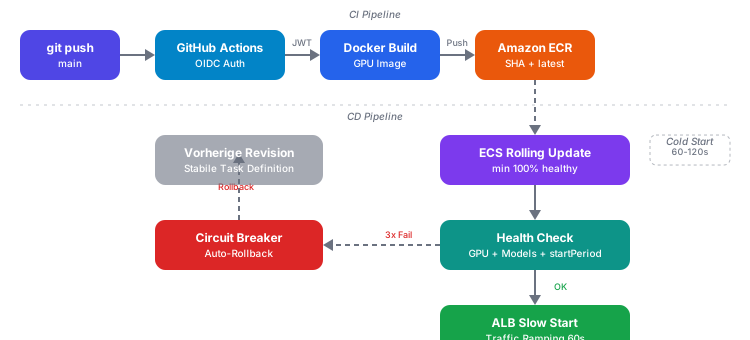
- Register new task definition: ECS creates a new revision with the updated image tag
- Start new tasks: ECS starts new tasks in parallel with existing ones (
maximum_percent = 200allows double capacity) - Wait for health check: The new tasks undergo health checks (up to 120 seconds)
- Redirect traffic: The ALB only routes traffic to new tasks after a successful health check
- Stop old tasks: Old tasks are only stopped after the new ones are healthy
deployment_minimum_healthy_percent = 100 means: at no point are there fewer healthy tasks than the desired count. No user experiences an outage during deployment.
Circuit Breaker: If three consecutive tasks fail the health check, ECS stops the deployment and automatically rolls back to the previous task definition. Without a circuit breaker, ECS would endlessly start and terminate new tasks, incurring GPU costs without making progress.
Health Checks for GPU Services
The health check is the most critical component in GPU deployments. A standard health check (GET /health with a 30s timeout) fails here because it cannot distinguish between "container is still starting" and "container is broken."
Application-Level Health Check
from fastapi import FastAPI
import torch

app = FastAPI()

models_loaded = False

@app.on_event("startup")
async def load_models():
    global models_loaded
    # Modelle in GPU-Speicher laden
    # Embedding-Modell, Reranker, etc.
    models_loaded = True

@app.get("/health")
async def health_check():
    checks = {
        "gpu_available": torch.cuda.is_available(),
        "gpu_memory_allocated": torch.cuda.memory_allocated() > 0,
        "models_loaded": models_loaded,
    }

    if all(checks.values()):
        return {"status": "healthy", "checks": checks}

    return {"status": "unhealthy", "checks": checks}, 503
This endpoint checks three things: Is a GPU available? Is GPU memory being used (models loaded)? Has the startup process successfully loaded all models? Only when all three conditions are met does the container report "healthy."
ECS Task Definition with startPeriod
resource "aws_ecs_task_definition" "ki_api" {
  family                   = "ki-rag-api"
  requires_compatibilities = ["EC2"]
  network_mode             = "bridge"
  execution_role_arn       = aws_iam_role.ecs_execution_role.arn
  task_role_arn            = aws_iam_role.ecs_task_role.arn

  container_definitions = jsonencode([
    {
      name      = "ki-rag-api"
      image     = "${aws_ecr_repository.ki_api.repository_url}:latest"
      cpu       = 2048
      memory    = 8192
      essential = true

      portMappings = [
        {
          containerPort = 8000
          hostPort      = 0
          protocol      = "tcp"
        }
      ]

      healthCheck = {
        command     = ["CMD-SHELL", "curl -f http://localhost:8000/health || exit 1"]
        interval    = 15
        timeout     = 10
        retries     = 8
        startPeriod = 120
      }

      resourceRequirements = [
        {
          type  = "GPU"
          value = "1"
        }
      ]

      logConfiguration = {
        logDriver = "awslogs"
        options = {
          "awslogs-group"         = "/ecs/ki-rag-api"
          "awslogs-region"        = var.aws_region
          "awslogs-stream-prefix" = "ecs"
        }
      }

      secrets = [
        {
          name      = "OPENAI_API_KEY"
          valueFrom = "${aws_secretsmanager_secret.openai_key.arn}"
        }
      ]
    }
  ])
}
startPeriod = 120 gives the container 120 seconds before the first health check counts. During this grace period, failed health checks are ignored. This is essential for GPU containers that need to load models. Without startPeriod, ECS would mark the container as unhealthy after a few failed checks and terminate it, even though it is still starting up.
ALB Slow Start
resource "aws_lb_target_group" "ki_api" {
  name     = "ki-rag-api"
  port     = 8000
  protocol = "HTTP"
  vpc_id   = var.vpc_id

  health_check {
    path                = "/health"
    healthy_threshold   = 2
    unhealthy_threshold = 5
    timeout             = 10
    interval            = 15
    matcher             = "200"
  }

  slow_start = 60

  stickiness {
    type    = "lb_cookie"
    enabled = false
  }
}
slow_start = 60 means: after a target is registered as healthy, it receives linearly increasing traffic over 60 seconds. Instead of immediately getting 50% of the load, it starts at nearly 0% and is gradually ramped up. This gives the GPU container time to compile CUDA kernels and warm up caches. Without slow start, the initial burst of requests can lead to timeouts because the initial GPU inference is slower than subsequent ones.
Dual safety net: ECS health checks protect at the container level (does the container start at all?), ALB slow start protects at the traffic level (is the container receiving too much load before it's ready?). Both mechanisms are independent and complement each other.
Two Deployment Patterns: Service vs. Task
Not every GPU workload needs a rolling deployment. The choice of pattern depends on the use case:
| Aspect | ECS Service (API) | ECS RunTask (Batch) |
|---|---|---|
| Availability | Always-on (24/7) | On-demand |
| Deployment | Rolling update + circuit breaker | No deployment needed |
| Image Tag | Commit SHA (reproducible) | latest (always current) |
| Trigger | ecs:UpdateService | EventBridge schedule / webhook |
| Scaling | Adjust desired_count | Start parallel tasks |
| Cost | Continuous (GPU reserved) | Only during execution |
API Service: For the RAG API that answers requests in real time. Rolling update with circuit breaker ensures no user experiences an outage. The image is referenced via the commit SHA, so it's exactly traceable which code is running.
Batch Task: For the ingestion pipeline that processes documents and writes to the vector database. The task references latest and automatically gets the newest version on every start. No explicit deployment needed. The task is triggered via EventBridge schedule (e.g., daily at 2:00 AM) or via webhook (new document uploaded).
The Complete GitHub Actions Pipeline
name: Deploy KI-API

on:
  push:
    branches: [main]

permissions:
  id-token: write   # OIDC Token anfordern
  contents: read     # Repository auschecken

env:
  AWS_REGION: eu-central-1
  ECR_REPOSITORY: ki-rag-api
  ECS_CLUSTER: ki-cluster
  ECS_SERVICE: ki-rag-api

jobs:
  deploy:
    runs-on: ubuntu-latest
    steps:
      - name: Checkout
        uses: actions/checkout@v4

      - name: Configure AWS Credentials (OIDC)
        uses: aws-actions/configure-aws-credentials@v4
        with:
          role-to-assume: arn:aws:iam::123456789012:role/github-actions-deploy
          aws-region: ${{ env.AWS_REGION }}

      - name: Login to Amazon ECR
        id: ecr-login
        uses: aws-actions/amazon-ecr-login@v2

      - name: Build, Tag, Push
        env:
          ECR_REGISTRY: ${{ steps.ecr-login.outputs.registry }}
          IMAGE_TAG: ${{ github.sha }}
        run: |
          docker build -t $ECR_REGISTRY/$ECR_REPOSITORY:$IMAGE_TAG .
          docker tag $ECR_REGISTRY/$ECR_REPOSITORY:$IMAGE_TAG \
                     $ECR_REGISTRY/$ECR_REPOSITORY:latest
          docker push $ECR_REGISTRY/$ECR_REPOSITORY:$IMAGE_TAG
          docker push $ECR_REGISTRY/$ECR_REPOSITORY:latest

      - name: Update ECS Task Definition
        id: task-def
        env:
          ECR_REGISTRY: ${{ steps.ecr-login.outputs.registry }}
          IMAGE_TAG: ${{ github.sha }}
        run: |
          TASK_DEF=$(aws ecs describe-task-definition \
            --task-definition ki-rag-api \
            --query 'taskDefinition' \
            --output json)

          NEW_TASK_DEF=$(echo $TASK_DEF | jq \
            --arg IMAGE "$ECR_REGISTRY/$ECR_REPOSITORY:$IMAGE_TAG" \
            '.containerDefinitions[0].image = $IMAGE |
             del(.taskDefinitionArn, .revision, .status,
                 .requiresAttributes, .compatibilities,
                 .registeredAt, .registeredBy)')

          NEW_ARN=$(aws ecs register-task-definition \
            --cli-input-json "$NEW_TASK_DEF" \
            --query 'taskDefinition.taskDefinitionArn' \
            --output text)

          echo "task_def_arn=$NEW_ARN" >> $GITHUB_OUTPUT

      - name: Deploy to ECS
        run: |
          aws ecs update-service \
            --cluster $ECS_CLUSTER \
            --service $ECS_SERVICE \
            --task-definition ${{ steps.task-def.outputs.task_def_arn }} \
            --force-new-deployment

      - name: Wait for Deployment
        run: |
          aws ecs wait services-stable \
            --cluster $ECS_CLUSTER \
            --services $ECS_SERVICE
The two lines under permissions are the heart of the OIDC integration. id-token: write allows GitHub Actions to request a JWT token from the OIDC provider. contents: read is needed for the checkout. Without this permissions declaration, OIDC authentication will fail.
The workflow builds the image, tags it with the commit SHA and latest, pushes both tags, registers a new task definition with the SHA tag, and updates the service. aws ecs wait services-stable waits until the rolling deployment is complete. If the circuit breaker triggers, this step fails and the workflow is marked as failed.
Secrets Management
Secrets don't belong in environment variables and certainly not in the Terraform state. AWS Secrets Manager provides a clean solution:
# Secret erstellen (Wert wird manuell oder per CLI gesetzt)
resource "aws_secretsmanager_secret" "openai_key" {
  name = "ki-rag-api/openai-api-key"
}

# ECS Execution Role darf Secrets lesen
resource "aws_iam_role_policy" "execution_secrets" {
  name = "secrets-access"
  role = aws_iam_role.ecs_execution_role.id

  policy = jsonencode({
    Version = "2012-10-17"
    Statement = [
      {
        Effect = "Allow"
        Action = [
          "secretsmanager:GetSecretValue"
        ]
        Resource = aws_secretsmanager_secret.openai_key.arn
      }
    ]
  })
}
The flow is: ECS starts the container. The execution role retrieves the secret value from Secrets Manager and injects it as an environment variable into the container. The secret value appears neither in the Terraform state, nor in the container logs, nor in the GitHub Actions log. The only place the value exists is in the running container process.
Rollback Strategies
Three levels of rollback, depending on the situation:
Automatic (Circuit Breaker): ECS detects that the new tasks are not becoming healthy and rolls back to the previous task definition. No manual intervention needed. This typically happens with faulty code or incompatible model versions.
Manual (Task Definition Revision): Each deployment creates a new revision. If you want to roll back to a specific version:
# Aktuelle Revisionen anzeigen
aws ecs list-task-definitions \
  --family-prefix ki-rag-api \
  --sort DESC \
  --max-items 5

# Auf eine bestimmte Revision zurückrollen
aws ecs update-service \
  --cluster ki-cluster \
  --service ki-rag-api \
  --task-definition ki-rag-api:42 \
  --force-new-deployment
Image-Level (Commit SHA): Since each image is tagged with the commit SHA, you can trace exactly which code is running in which revision. This makes debugging production issues significantly easier than a generic latest tag.
| Rollback Type | Trigger | Duration | Intervention |
|---|---|---|---|
| Circuit Breaker | Automatic on 3x failure | 2 to 5 minutes | None |
| Task Definition | Manual via CLI | 3 to 5 minutes | One command |
| Commit SHA | Manual via pipeline | 5 to 10 minutes | Git revert + push |
Conclusion
GPU-based AI systems require three fundamental adjustments compared to traditional CI/CD pipelines:
-
Timing Adjustments: Health checks, grace periods, and slow start must be designed for GPU cold starts. 120 seconds instead of 30, 60 seconds of slow start instead of immediate load.
-
Safety Net: The circuit breaker automatically catches failed deployments. Combined with ALB slow start, this creates a dual safety net that minimizes GPU costs from faulty releases.
-
Image Management: Lifecycle policies and a clear tagging strategy (commit SHA + latest) prevent cost growth and enable precise rollback.
OIDC authentication and least-privilege policies are not GPU-specific topics, but they form the foundation for a secure pipeline. Those familiar with serverless deployments on AWS will recognize the parallels in IAM roles and secrets management.
In the next article, we go one step further: the complete RAG infrastructure on AWS with GPU clusters, auto-scaling, and Terraform modules. If you're already working on RAG evaluation and testing, the infrastructure closes the loop from development through testing to production-ready operations.
Are you deploying GPU-based AI systems on AWS and need support with architecture or CI/CD? Contact me for a no-obligation consultation.