AWS Lambda mit Laravel: Serverless PHP in der Praxis

Foto von Jakub Żerdzicki auf Unsplash
Serverless Computing verspricht weniger Infrastruktur-Management, automatische Skalierung und Pay-per-Use-Abrechnung. Aber kann das auch mit PHP und Laravel funktionieren? Die Antwort ist: Ja, und zwar sehr gut!
Mit Laravel Vapor oder dem Bref-Framework können Sie Ihre Laravel-Anwendungen auf AWS Lambda deployen und von allen Vorteilen der Serverless-Architektur profitieren.
In diesem Artikel zeige ich Ihnen:
- Wie Sie Laravel für AWS Lambda vorbereiten
- Deployment mit Laravel Vapor vs. Bref
- Cold Starts optimieren
- Best Practices für produktionsreife Serverless-Laravel-Apps
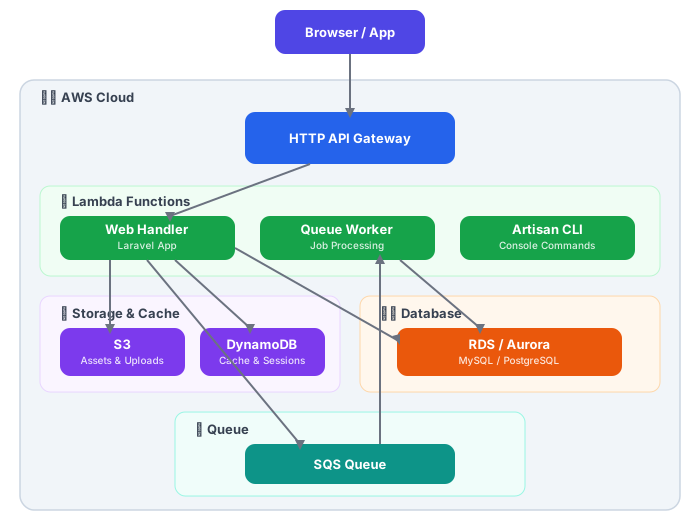
Warum Serverless für Laravel?
Vorteile
| Aspekt | Traditionell (EC2/ECS) | Serverless (Lambda) |
|---|---|---|
| Skalierung | Manuell/Auto-Scaling Rules | Automatisch, sofort |
| Kosten bei Idle | 24/7 Server-Kosten | Keine Kosten |
| Wartung | OS-Updates, Security Patches | Managed by AWS |
| Deployment | Container/Server-Config | Code-Upload |
| Startup | Sekunden (Container) | Cold Start: 100-500ms |
Wann Serverless?
Gut geeignet:
- APIs mit variablem Traffic
- Hintergrund-Jobs und Queue-Worker
- Websites mit unvorhersehbarem Traffic
- Microservices
Weniger geeignet:
- WebSocket-Verbindungen (lange Laufzeiten)
- Anwendungen mit konstantem, hohem Traffic
- Legacy-Code mit vielen Dateisystem-Operationen
Option 1: Laravel Vapor
Laravel Vapor ist die offizielle Serverless-Plattform von Laravel. Sie abstrahiert die AWS-Komplexität und bietet ein nahtloses Deployment-Erlebnis.
Einrichtung
# Vapor CLI installieren
composer global require laravel/vapor-cli

# In Ihrem Laravel-Projekt
composer require laravel/vapor

# Mit Vapor-Account verbinden
vapor login
Projekt initialisieren
vapor initDies erstellt eine vapor.yml Konfiguration:
# vapor.yml
id: 12345
name: meine-app
environments:
  production:
    memory: 1024
    cli-memory: 512
    runtime: 'php-8.3:al2'
    build:
      - 'composer install --no-dev'
      - 'npm ci && npm run build'
    deploy:
      - 'php artisan migrate --force'

  staging:
    memory: 512
    runtime: 'php-8.3:al2'
    database: my-staging-db
Datenbank-Konfiguration
Vapor nutzt RDS (MySQL/PostgreSQL) oder Aurora Serverless:
# vapor.yml
environments:
  production:
    database: my-production-db

databases:
  my-production-db:
    engine: 'mysql-8.0'
    class: 'db.t3.micro'
    storage: 20
    autoscaling: true
Queue-Worker als Lambda
# vapor.yml
environments:
  production:
    queues:
      - default
      - notifications
    queue-memory: 512
    queue-timeout: 60
Deployment
# Staging deployen
vapor deploy staging

# Production deployen
vapor deploy production
Vapor-spezifische Anpassungen
// config/filesystems.php
'disks' => [
    's3' => [
        'driver' => 's3',
        'key' => env('AWS_ACCESS_KEY_ID'),
        'secret' => env('AWS_SECRET_ACCESS_KEY'),
        'region' => env('AWS_DEFAULT_REGION'),
        'bucket' => env('AWS_BUCKET'),
    ],
],

// Vapor nutzt S3 für File-Uploads
// /tmp ist das einzige beschreibbare Verzeichnis in Lambda
// app/Providers/AppServiceProvider.php
public function boot(): void
{
// Assets von CloudFront laden wenn in Vapor
if ($this->app->environment('production') && isset($_ENV['VAPOR_ARTIFACT_NAME'])) {
URL::forceRootUrl(config('app.asset_url'));
}
}Option 2: Bref (Open Source Alternative)
Bref ist ein Open-Source-Framework für PHP auf Lambda, das mehr Kontrolle bietet:
Installation
composer require bref/bref bref/laravel-bridge

# Serverless Framework installieren
npm install -g serverless
Konfiguration
# serverless.yml
service: meine-laravel-app

provider:
  name: aws
  region: eu-central-1
  runtime: provided.al2
  environment:
    APP_ENV: production
    APP_DEBUG: false
    LOG_CHANNEL: stderr
    SESSION_DRIVER: cookie
    CACHE_DRIVER: dynamodb
    QUEUE_CONNECTION: sqs

plugins:
  - ./vendor/bref/bref

functions:
  web:
    handler: public/index.php
    runtime: php-83-fpm
    timeout: 28
    memorySize: 1024
    events:
      - httpApi: '*'

  artisan:
    handler: artisan
    runtime: php-83-console
    timeout: 720
    memorySize: 512

  queue:
    handler: Bref\LaravelBridge\Queue\QueueHandler
    runtime: php-83
    timeout: 60
    memorySize: 512
    events:
      - sqs:
          arn: !GetAtt JobsQueue.Arn
          batchSize: 1

resources:
  Resources:
    JobsQueue:
      Type: AWS::SQS::Queue
      Properties:
        QueueName: ${self:service}-jobs
        VisibilityTimeout: 120

    CacheTable:
      Type: AWS::DynamoDB::Table
      Properties:
        TableName: ${self:service}-cache
        AttributeDefinitions:
          - AttributeName: key
            AttributeType: S
        KeySchema:
          - AttributeName: key
            KeyType: HASH
        BillingMode: PAY_PER_REQUEST
Laravel für Bref anpassen
// config/cache.php
'dynamodb' => [
    'driver' => 'dynamodb',
    'key' => env('AWS_ACCESS_KEY_ID'),
    'secret' => env('AWS_SECRET_ACCESS_KEY'),
    'region' => env('AWS_DEFAULT_REGION', 'eu-central-1'),
    'table' => env('DYNAMODB_CACHE_TABLE', 'cache'),
    'endpoint' => env('DYNAMODB_ENDPOINT'),
],
// config/session.php
// Für Stateless APIs: Token-basierte Auth nutzen
// Für Sessions: Cookie-Driver oder DynamoDB
'driver' => env('SESSION_DRIVER', 'cookie'),Deployment mit Bref
# Deployment
serverless deploy

# Nur Code aktualisieren (schneller)
serverless deploy function -f web

# Logs anzeigen
serverless logs -f web -t

# Artisan-Befehle ausführen
vendor/bin/bref cli meine-laravel-app-production-artisan -- migrate --force
Cold Starts optimieren
Cold Starts sind die größte Herausforderung bei Serverless PHP. Hier sind bewährte Strategien:
1. Opcache Preloading
// config/opcache-preload.php
<?php
require_once __DIR__ . '/../vendor/autoload.php';

// Framework-Klassen vorladen
$preloadClasses = [
    \Illuminate\Foundation\Application::class,
    \Illuminate\Http\Request::class,
    \Illuminate\Http\Response::class,
    \Illuminate\Routing\Router::class,
    \Illuminate\Database\Eloquent\Model::class,
];

foreach ($preloadClasses as $class) {
    if (class_exists($class)) {
        // Klasse wird durch class_exists geladen
    }
}
; php.ini für Lambda (via Layer)
opcache.enable=1
opcache.enable_cli=1
opcache.preload=/var/task/config/opcache-preload.php
opcache.preload_user=root2. Config und Route Caching
# In Ihrem Build-Prozess
php artisan config:cache
php artisan route:cache
php artisan view:cache
php artisan event:cache
# vapor.yml
environments:
production:
build:
- 'composer install --no-dev --optimize-autoloader'
- 'php artisan config:cache'
- 'php artisan route:cache'
- 'php artisan view:cache'3. Package-Größe reduzieren
// composer.json
{
    "autoload": {
        "classmap": [
            "database/factories",
            "database/seeders"
        ],
        "psr-4": {
            "App\\": "app/"
        },
        "exclude-from-classmap": [
            "tests/"
        ]
    }
}
# Development-Dependencies entfernen
composer install --no-dev --optimize-autoloader
# Unnötige Dateien entfernen
rm -rf tests/ .git/ node_modules/4. Provisioned Concurrency (kostenpflichtig)
# serverless.yml
functions:
  web:
    provisionedConcurrency: 5  # 5 warme Instanzen
5. Lazy Loading von Services
// app/Providers/AppServiceProvider.php
public function register(): void
{
    // Services erst laden wenn benötigt
    $this->app->singleton(HeavyService::class, function ($app) {
        return new HeavyService();
    });
}
Praktische Beispiele
API-Endpoint mit Response Caching
// app/Http/Controllers/Api/ProductController.php
namespace App\Http\Controllers\Api;

use App\Models\Product;
use Illuminate\Http\JsonResponse;
use Illuminate\Support\Facades\Cache;

class ProductController extends Controller
{
    public function index(): JsonResponse
    {
        // Cache für 5 Minuten (Lambda-freundlich)
        $products = Cache::remember('products.all', 300, function () {
            return Product::with(['category', 'images'])
                ->active()
                ->orderBy('created_at', 'desc')
                ->limit(100)
                ->get();
        });

        return response()->json([
            'data' => $products,
            'meta' => [
                'cached_at' => now()->toIso8601String(),
            ]
        ]);
    }

    public function show(string $slug): JsonResponse
    {
        $cacheKey = "products.{$slug}";

        $product = Cache::remember($cacheKey, 300, function () use ($slug) {
            return Product::with(['category', 'images', 'reviews'])
                ->where('slug', $slug)
                ->firstOrFail();
        });

        return response()->json(['data' => $product]);
    }
}
Queue-Job für Hintergrundverarbeitung
// app/Jobs/ProcessImageUpload.php
namespace App\Jobs;

use App\Models\Image;
use Illuminate\Bus\Queueable;
use Illuminate\Contracts\Queue\ShouldQueue;
use Illuminate\Foundation\Bus\Dispatchable;
use Illuminate\Queue\InteractsWithQueue;
use Illuminate\Queue\SerializesModels;
use Illuminate\Support\Facades\Storage;
use Intervention\Image\Facades\Image as ImageProcessor;

class ProcessImageUpload implements ShouldQueue
{
    use Dispatchable, InteractsWithQueue, Queueable, SerializesModels;

    public int $tries = 3;
    public int $timeout = 60;

    public function __construct(
        public Image $image,
        public string $s3Key
    ) {}

    public function handle(): void
    {
        // Bild von S3 laden
        $originalImage = Storage::disk('s3')->get($this->s3Key);

        // In /tmp speichern (einziger beschreibbarer Ort in Lambda)
        $tempPath = '/tmp/' . basename($this->s3Key);
        file_put_contents($tempPath, $originalImage);

        // Thumbnails erstellen
        $sizes = [
            'thumb' => [150, 150],
            'medium' => [600, 400],
            'large' => [1200, 800],
        ];

        foreach ($sizes as $name => [$width, $height]) {
            $resized = ImageProcessor::make($tempPath)
                ->fit($width, $height)
                ->encode('webp', 85);

            $newKey = str_replace(
                basename($this->s3Key),
                "{$name}_" . pathinfo($this->s3Key, PATHINFO_FILENAME) . '.webp',
                $this->s3Key
            );

            Storage::disk('s3')->put($newKey, $resized->getEncoded());
        }

        // Original als WebP speichern
        $webpImage = ImageProcessor::make($tempPath)
            ->encode('webp', 90);

        Storage::disk('s3')->put(
            str_replace(
                '.' . pathinfo($this->s3Key, PATHINFO_EXTENSION),
                '.webp',
                $this->s3Key
            ),
            $webpImage->getEncoded()
        );

        // Temp-Datei aufräumen
        unlink($tempPath);

        // Model aktualisieren
        $this->image->update(['processed' => true]);
    }

    public function failed(\Throwable $exception): void
    {
        $this->image->update([
            'processed' => false,
            'error' => $exception->getMessage(),
        ]);
    }
}
Scheduled Tasks in Serverless
// app/Console/Kernel.php
protected function schedule(Schedule $schedule): void
{
    // Für Vapor/Bref: CloudWatch Events triggern diese
    $schedule->command('reports:daily')
        ->dailyAt('06:00')
        ->timezone('Europe/Berlin');

    $schedule->command('cache:prune-stale-tags')
        ->hourly();

    // Cleanup-Job (wichtig für /tmp in Lambda)
    $schedule->call(function () {
        $files = glob('/tmp/*');
        foreach ($files as $file) {
            if (is_file($file) && time() - filemtime($file) > 3600) {
                unlink($file);
            }
        }
    })->hourly();
}
# serverless.yml - Scheduled Events
functions:
scheduler:
handler: artisan
runtime: php-83-console
events:
- schedule:
rate: rate(1 minute)
input:
cli: "schedule:run"Monitoring und Debugging
CloudWatch Logs konfigurieren
// config/logging.php
'channels' => [
    'stderr' => [
        'driver' => 'monolog',
        'level' => env('LOG_LEVEL', 'debug'),
        'handler' => StreamHandler::class,
        'with' => [
            'stream' => 'php://stderr',
        ],
    ],
],
Custom Metriken
// app/Services/MetricsService.php
namespace App\Services;

use Aws\CloudWatch\CloudWatchClient;

class MetricsService
{
    private CloudWatchClient $client;

    public function __construct()
    {
        $this->client = new CloudWatchClient([
            'region' => config('services.aws.region'),
            'version' => 'latest',
        ]);
    }

    public function recordLatency(string $operation, float $milliseconds): void
    {
        $this->client->putMetricData([
            'Namespace' => 'MyApp/Performance',
            'MetricData' => [
                [
                    'MetricName' => 'OperationLatency',
                    'Dimensions' => [
                        [
                            'Name' => 'Operation',
                            'Value' => $operation,
                        ],
                    ],
                    'Value' => $milliseconds,
                    'Unit' => 'Milliseconds',
                ],
            ],
        ]);
    }

    public function recordColdStart(): void
    {
        $this->client->putMetricData([
            'Namespace' => 'MyApp/Lambda',
            'MetricData' => [
                [
                    'MetricName' => 'ColdStart',
                    'Value' => 1,
                    'Unit' => 'Count',
                ],
            ],
        ]);
    }
}
Request-Tracing mit X-Ray
// app/Http/Middleware/XRayMiddleware.php
namespace App\Http\Middleware;

use Closure;
use Illuminate\Http\Request;

class XRayMiddleware
{
    public function handle(Request $request, Closure $next)
    {
        $traceId = $request->header('X-Amzn-Trace-Id');

        if ($traceId) {
            // Trace-ID für Logs verfügbar machen
            config(['app.trace_id' => $traceId]);
        }

        return $next($request);
    }
}
Kosten-Übersicht
Lambda-Kosten (eu-central-1)
| Ressource | Preis |
|---|---|
| Requests | $0.20 / 1M Requests |
| Duration (1GB) | $0.0000166667 / GB-Sekunde |
| Free Tier | 1M Requests + 400,000 GB-Sekunden / Monat |
Beispielrechnung
API mit 100,000 Requests/Tag:
- 3M Requests/Monat: ~$0.60
- Duration (avg 200ms, 1GB): ~$10
- API Gateway: ~$3.50
- Gesamt: ~$14/Monat
Vergleich: EC2 t3.small 24/7 = ~$15/Monat (ohne Auto-Scaling)
Fazit
Laravel auf AWS Lambda ist produktionsreif und bietet echte Vorteile:
- Kosteneffizienz bei variablem Traffic
- Keine Server-Wartung
- Automatische Skalierung
- Pay-per-Use
Die Wahl zwischen Vapor und Bref hängt von Ihren Anforderungen ab:
| Kriterium | Vapor | Bref |
|---|---|---|
| Einrichtung | Einfacher | Mehr Kontrolle |
| Kosten | $39+/Monat + AWS | Nur AWS |
| Support | Offiziell | Community |
| Customization | Eingeschränkt | Flexibel |
Für die meisten Laravel-Projekte empfehle ich Vapor wegen der nahtlosen Integration. Für komplexere Setups oder Kostensensitivität ist Bref die bessere Wahl.