
Model Context Protocol (MCP): The Future of Tool Integration

Photo by Tiago Ferreira on Unsplash
Imagine your AI could not only generate text but also query your database, send emails, execute code, and interact with any external system -- all through a standardized protocol. That's exactly what the Model Context Protocol (MCP) enables.
In this article, we'll dive deep into the architecture of MCP and build a working MCP server together that you can use directly in Claude Desktop or other MCP-compatible clients.
What Is the Model Context Protocol?
MCP is an open protocol developed by Anthropic to standardize communication between AI models and external data sources or tools. It solves a fundamental problem: How can LLMs interact with the outside world safely and consistently?
The Problem Before MCP
Traditionally, each integration had to be developed individually:
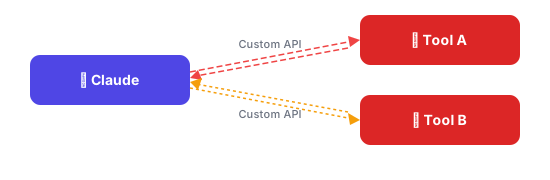
Problems:
- Each tool needs its own integration
- No reusability
- Inconsistent interfaces
- Security risks from ad-hoc solutions
The MCP Solution
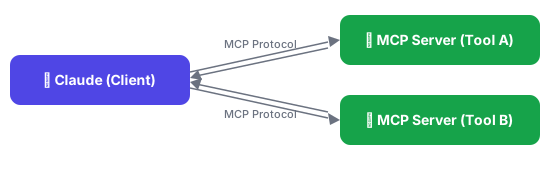
MCP introduces a standardized abstraction layer:
Architecture in Detail
MCP is based on a client-server architecture with JSON-RPC 2.0 as the communication protocol.
The Three Main Components
1. MCP Host (Client)
The host is the AI application that uses MCP servers:
- Claude Desktop: Anthropic's desktop application
- Claude Code: The CLI for developers
- Custom Applications: Any app that implements the MCP protocol
The host:
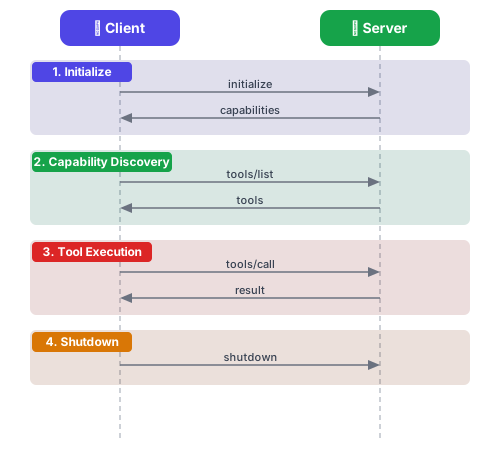
- Initiates connections to MCP servers
- Sends requests for tools, resources, and prompts
- Processes server responses
- Manages the connection lifecycle
2. MCP Server
A server provides capabilities:
| Capability | Description | Example |
|---|---|---|
| Tools | Executable functions | search_database, send_email |
| Resources | Readable data sources | Files, database schemas, APIs |
| Prompts | Predefined prompt templates | Analysis workflows, report generation |
3. Transport Layer
MCP supports various transport mechanisms:
// stdio - Für lokale Prozesse
{
  "command": "python",
  "args": ["server.py"],
  "transport": "stdio"
}

// SSE - Für Remote-Server
{
  "url": "https://api.example.com/mcp",
  "transport": "sse"
}
The Connection Lifecycle
Building an MCP Server
Now it gets practical: we'll build an MCP server that provides access to a SQLite database.
Project Structure
mcp-sqlite-server/
├── src/
│   └── index.ts
├── package.json
├── tsconfig.json
└── README.md
Setup
mkdir mcp-sqlite-server && cd mcp-sqlite-server
npm init -y
npm install @modelcontextprotocol/sdk better-sqlite3
npm install -D typescript @types/node @types/better-sqlite3
The Server Code
// src/index.ts
import { Server } from "@modelcontextprotocol/sdk/server/index.js";
import { StdioServerTransport } from "@modelcontextprotocol/sdk/server/stdio.js";
import {
  CallToolRequestSchema,
  ListToolsRequestSchema,
  ListResourcesRequestSchema,
  ReadResourceRequestSchema,
} from "@modelcontextprotocol/sdk/types.js";
import Database from "better-sqlite3";

// Datenbank initialisieren
const db = new Database("./data.db");

// Server erstellen
const server = new Server(
  {
    name: "sqlite-server",
    version: "1.0.0",
  },
  {
    capabilities: {
      tools: {},
      resources: {},
    },
  }
);

// Tools definieren
server.setRequestHandler(ListToolsRequestSchema, async () => ({
  tools: [
    {
      name: "query",
      description: "Führt eine SELECT-Abfrage auf der Datenbank aus",
      inputSchema: {
        type: "object",
        properties: {
          sql: {
            type: "string",
            description: "Die SQL SELECT-Abfrage",
          },
        },
        required: ["sql"],
      },
    },
    {
      name: "execute",
      description: "Führt eine INSERT/UPDATE/DELETE-Abfrage aus",
      inputSchema: {
        type: "object",
        properties: {
          sql: {
            type: "string",
            description: "Die SQL-Anweisung",
          },
          params: {
            type: "array",
            description: "Parameter für Prepared Statements",
            items: { type: "string" },
          },
        },
        required: ["sql"],
      },
    },
  ],
}));

// Tool-Ausführung
server.setRequestHandler(CallToolRequestSchema, async (request) => {
  const { name, arguments: args } = request.params;

  try {
    switch (name) {
      case "query": {
        // Nur SELECT erlauben
        const sql = args?.sql as string;
        if (!sql.trim().toUpperCase().startsWith("SELECT")) {
          throw new Error("Nur SELECT-Abfragen erlaubt");
        }
        const rows = db.prepare(sql).all();
        return {
          content: [
            {
              type: "text",
              text: JSON.stringify(rows, null, 2),
            },
          ],
        };
      }

      case "execute": {
        const sql = args?.sql as string;
        const params = (args?.params as string[]) || [];

        // Gefährliche Operationen verhindern
        const upperSql = sql.trim().toUpperCase();
        if (upperSql.startsWith("DROP") || upperSql.startsWith("TRUNCATE")) {
          throw new Error("DROP und TRUNCATE sind nicht erlaubt");
        }

        const result = db.prepare(sql).run(...params);
        return {
          content: [
            {
              type: "text",
              text: JSON.stringify({
                changes: result.changes,
                lastInsertRowid: result.lastInsertRowid,
              }),
            },
          ],
        };
      }

      default:
        throw new Error(`Unbekanntes Tool: ${name}`);
    }
  } catch (error) {
    return {
      content: [
        {
          type: "text",
          text: `Fehler: ${error instanceof Error ? error.message : String(error)}`,
        },
      ],
      isError: true,
    };
  }
});

// Resources: Datenbank-Schema bereitstellen
server.setRequestHandler(ListResourcesRequestSchema, async () => ({
  resources: [
    {
      uri: "sqlite://schema",
      name: "Datenbank-Schema",
      description: "Das Schema aller Tabellen in der Datenbank",
      mimeType: "application/json",
    },
  ],
}));

server.setRequestHandler(ReadResourceRequestSchema, async (request) => {
  const { uri } = request.params;

  if (uri === "sqlite://schema") {
    const tables = db
      .prepare(
        `SELECT name, sql FROM sqlite_master
         WHERE type='table' AND name NOT LIKE 'sqlite_%'`
      )
      .all();

    return {
      contents: [
        {
          uri,
          mimeType: "application/json",
          text: JSON.stringify(tables, null, 2),
        },
      ],
    };
  }

  throw new Error(`Unbekannte Resource: ${uri}`);
});

// Server starten
async function main() {
  const transport = new StdioServerTransport();
  await server.connect(transport);
  console.error("SQLite MCP Server gestartet");
}

main().catch(console.error);
TypeScript Configuration
// tsconfig.json
{
  "compilerOptions": {
    "target": "ES2022",
    "module": "NodeNext",
    "moduleResolution": "NodeNext",
    "outDir": "./dist",
    "rootDir": "./src",
    "strict": true,
    "esModuleInterop": true,
    "skipLibCheck": true
  },
  "include": ["src/**/*"]
}
Build and Test
# Kompilieren
npx tsc

# Testen (manuell)
echo '{"jsonrpc":"2.0","id":1,"method":"initialize","params":{"capabilities":{}}}' | node dist/index.js
Integration into Claude Desktop
After building, you can register the server in Claude Desktop:
// ~/Library/Application Support/Claude/claude_desktop_config.json (macOS)
// %APPDATA%/Claude/claude_desktop_config.json (Windows)
{
  "mcpServers": {
    "sqlite": {
      "command": "node",
      "args": ["/pfad/zu/mcp-sqlite-server/dist/index.js"],
      "env": {
        "NODE_ENV": "production"
      }
    }
  }
}
After restarting Claude Desktop, the server will be available.
Best Practices for MCP Servers
1. Security
// Input-Validierung
function validateSql(sql: string): boolean {
  const forbidden = ["DROP", "TRUNCATE", "DELETE FROM", "UPDATE"];
  const upperSql = sql.toUpperCase();
  return !forbidden.some((keyword) => upperSql.includes(keyword));
}

// Prepared Statements verwenden
const stmt = db.prepare("SELECT * FROM users WHERE id = ?");
const user = stmt.get(userId);
2. Error Handling
server.setRequestHandler(CallToolRequestSchema, async (request) => {
  try {
    // Tool-Logik
    return { content: [{ type: "text", text: result }] };
  } catch (error) {
    // Strukturierte Fehler zurückgeben
    return {
      content: [
        {
          type: "text",
          text: JSON.stringify({
            error: true,
            message: error.message,
            code: error.code || "UNKNOWN",
          }),
        },
      ],
      isError: true,
    };
  }
});
3. Logging
import { Logger } from "./logger";

const logger = new Logger("mcp-sqlite");

server.setRequestHandler(CallToolRequestSchema, async (request) => {
  logger.info("Tool aufgerufen", {
    tool: request.params.name,
    args: request.params.arguments,
  });

  // ... Tool-Logik

  logger.debug("Tool abgeschlossen", { duration: Date.now() - start });
});
4. Documentation
Every tool should be thoroughly documented:
{
  name: "query",
  description: `
    Führt eine SELECT-Abfrage auf der SQLite-Datenbank aus.

    Beispiele:
    - "SELECT * FROM users WHERE active = 1"
    - "SELECT name, email FROM users LIMIT 10"

    Einschränkungen:
    - Nur SELECT-Abfragen erlaubt
    - Maximal 1000 Ergebnisse
  `,
  inputSchema: {
    type: "object",
    properties: {
      sql: {
        type: "string",
        description: "Eine gültige SQL SELECT-Abfrage",
        examples: ["SELECT * FROM users", "SELECT COUNT(*) FROM orders"],
      },
    },
    required: ["sql"],
  },
}
Advanced Patterns
Streaming for Large Datasets
// Für große Result-Sets: Pagination implementieren
server.setRequestHandler(CallToolRequestSchema, async (request) => {
  const { offset = 0, limit = 100 } = request.params.arguments || {};

  const rows = db
    .prepare(`SELECT * FROM large_table LIMIT ? OFFSET ?`)
    .all(limit, offset);

  return {
    content: [
      {
        type: "text",
        text: JSON.stringify({
          data: rows,
          pagination: {
            offset,
            limit,
            hasMore: rows.length === limit,
          },
        }),
      },
    ],
  };
});
Prompt Templates
server.setRequestHandler(ListPromptsRequestSchema, async () => ({
  prompts: [
    {
      name: "analyze-table",
      description: "Analysiert die Struktur und Daten einer Tabelle",
      arguments: [
        {
          name: "tableName",
          description: "Name der zu analysierenden Tabelle",
          required: true,
        },
      ],
    },
  ],
}));

server.setRequestHandler(GetPromptRequestSchema, async (request) => {
  const { name, arguments: args } = request.params;

  if (name === "analyze-table") {
    return {
      messages: [
        {
          role: "user",
          content: {
            type: "text",
            text: `Analysiere die Tabelle "${args?.tableName}":

1. Zeige das Schema der Tabelle
2. Wie viele Einträge gibt es?
3. Welche Spalten haben NULL-Werte?
4. Gibt es Duplikate?

Nutze die verfügbaren Tools um diese Fragen zu beantworten.`,
          },
        },
      ],
    };
  }

  throw new Error(`Unbekannter Prompt: ${name}`);
});
Debugging and Development
MCP Inspector
Anthropic provides an inspector for development:
npx @modelcontextprotocol/inspector node dist/index.jsThis opens a web UI for testing your tools and resources.
Logging During Development
// Alle JSON-RPC Nachrichten loggen
process.stdin.on("data", (data) => {
  console.error("← Eingehend:", data.toString());
});

const originalWrite = process.stdout.write.bind(process.stdout);
process.stdout.write = (chunk: any, ...args: any[]) => {
  console.error("→ Ausgehend:", chunk.toString());
  return originalWrite(chunk, ...args);
};
Outlook
MCP is still young, but development is progressing rapidly:
- More Transports: WebSocket support, gRPC
- Authentication: OAuth, API keys at the protocol level
- Ecosystem: Growing library of community servers
- IDE Integration: VS Code extensions, JetBrains plugins
The protocol has the potential to become the standard for AI tool integration -- similar to how HTTP became the standard for web communication.
Conclusion
MCP provides an elegant solution to the problem of AI tool integration:
- Standardization: One protocol for all tools
- Security: Clear boundaries between client and server
- Reusability: One server, many clients
- Extensibility: Easily add new capabilities
With the knowledge from this article, you can:
- Understand and explain the MCP architecture
- Build your own MCP servers for your use cases
- Evaluate and integrate existing servers
Interested in an MCP integration for your company? Contact me for technical consulting.