
Laravel Octane: 10x Performance Boost with Swoole

Photo by Sumaid pal Singh Bakshi on Unsplash
PHP has a secret that many developers don't know: With every single request, a Laravel application goes through the complete lifecycle -- boot the framework, register service providers, load middleware, process the request, send the response, throw everything away. Boot, Handle, Die. Thousands of times per minute. It's like reinstalling your phone's operating system before every call.
Laravel Octane breaks with this paradigm. It boots your application once, keeps it in memory, and serves requests at a speed that makes PHP-FPM look outdated. Combined with Swoole -- an asynchronous, high-performance network framework for PHP -- you can achieve performance gains that were unthinkable in the PHP world just a few years ago.
In this article, I'll show you how to set up Laravel Octane with Swoole, what exclusive features are available to you, and what pitfalls you absolutely need to avoid. If you already have experience with Laravel performance optimization, you'll take the next big leap here.
What you can achieve after this article:
- Up to 10x more requests per second compared to PHP-FPM
- Parallel database queries with Concurrent Tasks
- 2 million cache operations per second with Swoole Tables
- A production-ready deployment with Supervisor and Nginx
What Is Laravel Octane?
Laravel Octane is an official first-party package that serves your Laravel application through high-performance application servers. Instead of booting the entire framework on every request, Octane starts the application once and keeps it in memory. Incoming requests are then processed directly by already-initialized workers -- without the overhead of repeated bootstrapping.
Octane supports multiple server backends:
| Server | Type | Key Features |
|---|---|---|
| Swoole | C Extension | Concurrency, Ticks, Cache, Tables, WebSockets |
| FrankenPHP | Go-based | HTTP/3, Early Hints, Worker Mode |
| RoadRunner | Go-based | Simple setup, good stability |
| Open Swoole | C Extension | Fork of Swoole, community-driven |
In this article, we focus on Swoole because it offers the most comprehensive feature set: true concurrency with coroutines, timers for background tasks, an ultra-fast in-memory cache, and shared-memory tables for communication between workers. No other option brings this complete package.
How Does Octane Differ from OPcache?
A legitimate question that comes up often: OPcache caches the compiled bytecode of your PHP files so PHP doesn't have to re-parse them on every request. This saves the parsing step, but the entire framework bootstrap -- registering service providers, loading configuration, compiling routes -- still happens on every request.
Octane goes a fundamental step further: It caches not just the bytecode but the entire state of the booted application. The difference is comparable to "keeping the blueprint on hand" (OPcache) versus "reusing the finished building" (Octane). Ideally, you use both together -- OPcache for bytecode, Octane for application state.
Installation and Setup
Installing Swoole
Swoole is a PHP extension installed via PECL. On Ubuntu/Debian:
# Abhängigkeiten installieren
sudo apt-get install php-dev php-pear libcurl4-openssl-dev libssl-dev

# Swoole Extension installieren
pecl install swoole

# Extension aktivieren (php.ini)
echo "extension=swoole.so" | sudo tee /etc/php/8.4/cli/conf.d/20-swoole.ini

# Verifizieren
php -m | grep swoole
Alternatively with Docker -- often the easier path:
FROM php:8.4-cli

RUN apt-get update && apt-get install -y libssl-dev libcurl4-openssl-dev \
    && pecl install swoole \
    && docker-php-ext-enable swoole
Integrating Octane into Your Project
# Octane Paket installieren
composer require laravel/octane

# Octane Setup ausführen (wähle Swoole als Server)
php artisan octane:install
The octane:install command creates the configuration file config/octane.php and asks which server you want to use. Choose swoole.
First Start
# Octane starten
php artisan octane:start --server=swoole

# Mit spezifischem Host und Port
php artisan octane:start --server=swoole --host=0.0.0.0 --port=8000

# Im Entwicklungsmodus mit Auto-Reload bei Dateiänderungen
php artisan octane:start --server=swoole --watch
If everything works, you'll see:
   INFO  Server running…

  Local: http://127.0.0.1:8000
Your application is now running directly in memory instead of through PHP-FPM. You'll feel the difference on the very first request.
How Octane Works
The Traditional PHP-FPM Lifecycle
In a classic PHP-FPM environment, the following happens on every request:
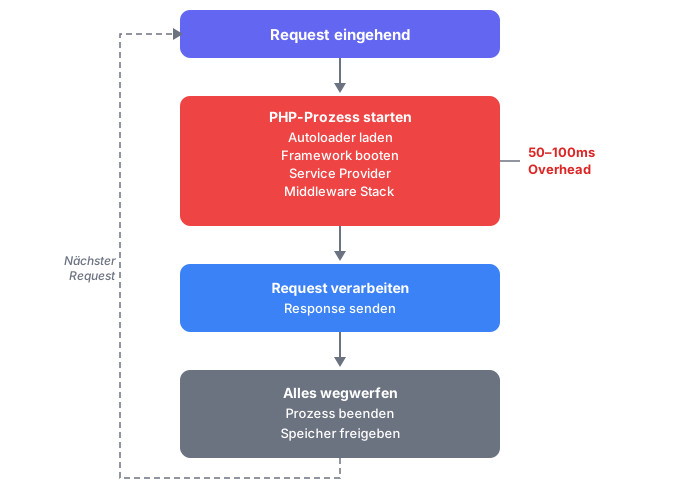
This cycle has advantages -- no memory leaks, no state issues -- but the price is high: On every request, the entire framework with all service providers, configurations, and routes is reloaded. For a typical Laravel project with dozens of packages, that easily adds 50-100ms of overhead before even a single line of your code runs.
The Octane Worker Model
Octane reverses this model:
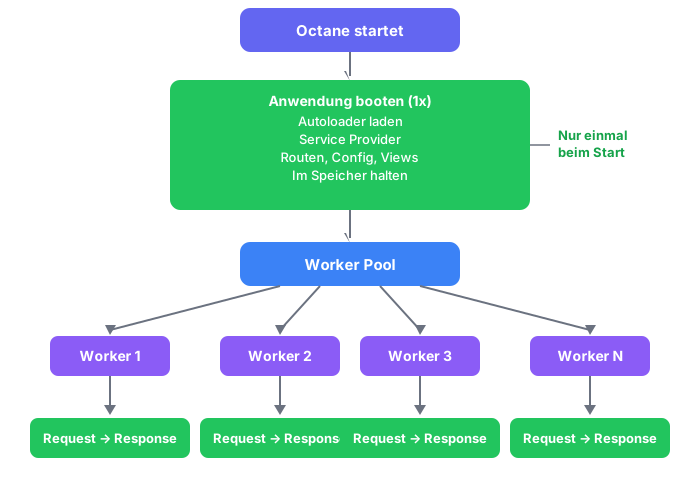
Each worker is an independent process that holds a copy of the already-booted application in memory. Incoming requests are distributed to available workers. The crucial point: The boot overhead is completely eliminated. The worker already has everything loaded and can start processing immediately.
Memory Persistence Between Requests
Because the application stays in memory, state is also persistent. This means: singletons, static variables, and resolved bindings persist between requests. This is simultaneously Octane's greatest strength and the most common source of bugs -- more on that in the "Pitfalls" section.
Swoole-Exclusive Features
Swoole brings features that are not available with any other Octane backend. This is where the real value lies.
Concurrent Tasks: Parallel Execution
Normally, database queries run sequentially: first load users, then load servers, then calculate statistics. With Octane::concurrently(), these operations run simultaneously:
use App\Models\User;
use App\Models\Server;
use App\Models\Metric;
use Laravel\Octane\Facades\Octane;

// Sequentiell: ~300ms (100ms + 100ms + 100ms)
$users = User::all();         // 100ms
$servers = Server::all();     // 100ms
$metrics = Metric::latest();  // 100ms

// Parallel mit Octane: ~100ms (alle gleichzeitig)
[$users, $servers, $metrics] = Octane::concurrently([
    fn () => User::all(),
    fn () => Server::all(),
    fn () => Metric::latest()->get(),
]);
The result: Instead of waiting 300ms, you only wait 100ms -- the duration of the longest individual operation. For dashboard pages with many independent data sources, this is an enormous gain.
Important: Concurrent Tasks use Swoole's Task Workers. You need to configure these at startup:
php artisan octane:start --server=swoole --task-workers=6Ticks and Intervals: Background Timers
With Swoole, you can define periodic tasks directly in your application -- without cron jobs or external schedulers:
use Laravel\Octane\Facades\Octane;

// Alle 10 Sekunden Metriken senden
Octane::tick('report-metrics', fn () => Metrics::report())
    ->seconds(10);

// Alle 5 Minuten Health Check ausführen
Octane::tick('health-check', fn () => HealthCheck::run())
    ->minutes(5);

// Alle 30 Sekunden Cache aufwärmen
Octane::tick('warm-cache', fn () => CacheWarmer::warm())
    ->seconds(30);
This is ideal for monitoring, heartbeat signals, or regular data aggregation. You typically register ticks in a service provider.
Octane Cache: 2 Million Operations Per Second
Octane comes with its own cache driver built on Swoole Tables. This cache lives entirely in memory -- no Redis, no Memcached, no network latency:
use Illuminate\Support\Facades\Cache;
use Illuminate\Support\Str;

// Standard Cache-Operationen über den Octane Store
Cache::store('octane')->put('key', 'value', 30);
$value = Cache::store('octane')->get('key');

// Interval-basierter Cache: Wert wird automatisch alle X Sekunden erneuert
Cache::store('octane')->interval('random', function () {
    return Str::random(10);
}, seconds: 5);
The interval cache is particularly useful for values that need regular updates but shouldn't be recalculated on every request -- such as API rate limits, feature flags, or aggregated statistics.
Cache Backend Performance Comparison:
| Backend | Operations/Sec | Latency | Network Required |
|---|---|---|---|
| Octane Cache | ~2,000,000 | < 1 μs | No |
| Redis | ~100,000 | ~0.5 ms | Yes |
| Memcached | ~80,000 | ~0.5 ms | Yes |
| File System | ~10,000 | ~2 ms | No |
Swoole Tables: Shared Memory Between Workers
Swoole Tables are in-memory data structures shared by all workers. This is unique: normally each worker has its own isolated memory.
Define the tables in config/octane.php:
'tables' => [
    'example:1000' => [
        'name' => 'string:1000',
        'votes' => 'int',
    ],
],
The format is name:max_rows. Column types are string:length, int, and float.
Accessing them in code:
use Laravel\Octane\Facades\Octane;

// Schreiben
Octane::table('example')->set('row-1', [
    'name' => 'Laravel Octane',
    'votes' => 42,
]);

// Lesen
$row = Octane::table('example')->get('row-1');
echo $row['name'];   // "Laravel Octane"
echo $row['votes'];  // 42

// Inkrementieren (atomar!)
Octane::table('example')->incr('row-1', 'votes', 1);
Typical use cases for Swoole Tables:
- Rate Limiting without Redis
- Session counters across all workers
- Feature Flags with instant propagation
- Connection Pools and worker coordination
Practical Example: Dashboard with All Features
Here's a realistic example combining multiple Swoole features -- an admin dashboard that loads data from various sources in parallel and keeps frequently accessed metrics in the Octane Cache:
use Laravel\Octane\Facades\Octane;
use Illuminate\Support\Facades\Cache;

class DashboardController extends Controller
{
    public function index()
    {
        // Feature Flags aus dem Octane Cache (wird alle 60s aktualisiert)
        $features = Cache::store('octane')->get('features');

        // Parallele Datenabfrage mit Concurrent Tasks
        [$users, $revenue, $tickets, $serverLoad] = Octane::concurrently([
            fn () => User::where('created_at', '>=', now()->subDay())->count(),
            fn () => Order::where('created_at', '>=', now()->subDay())->sum('total'),
            fn () => Ticket::where('status', 'open')->count(),
            fn () => MetricsService::getServerLoad(),
        ]);

        // Online-Benutzer aus Swoole Table lesen (von allen Workern geteilt)
        $onlineCount = 0;
        foreach (Octane::table('sessions') as $row) {
            if ($row['last_seen'] > now()->subMinutes(5)->timestamp) {
                $onlineCount++;
            }
        }

        return view('dashboard', compact(
            'features', 'users', 'revenue', 'tickets', 'serverLoad', 'onlineCount'
        ));
    }
}
Without Octane, the four database queries would run sequentially, cache access would go through Redis, and the online count would require its own database query. With Octane, the entire request takes a fraction of the time.
Optimizing Configuration
The default Octane configuration is a good starting point, but for production environments you should adjust the parameters to match your hardware.
Worker Count
The rule of thumb: one worker per CPU core. Octane defaults to auto, which matches the number of available CPU cores.
# Explizit setzen
php artisan octane:start --workers=4 --task-workers=6 --max-requests=1000| Parameter | Recommendation | Explanation |
|---|---|---|
--workers | Number of CPU cores | Process HTTP requests |
--task-workers | Cores x 1.5 | For Concurrent Tasks |
--max-requests | 500-1000 | Worker restart after N requests |
Max Requests: Memory Leak Prevention
The --max-requests parameter is your safety net against memory leaks. After the specified number of requests, a worker is automatically restarted and replaced with a fresh one. The default of 500 is conservative -- for a well-written application you can go to 1000 or higher.
Swoole Options in config/octane.php
The config/octane.php file offers fine-grained control over Swoole behavior:
'swoole' => [
    'options' => [
        // Worker-Anzahl (0 = auto = CPU-Kerne)
        'worker_num' => env('OCTANE_WORKERS', 0),

        // Task Worker für Concurrent Tasks
        'task_worker_num' => env('OCTANE_TASK_WORKERS', 6),

        // Max Requests bevor Worker recycelt wird
        'max_request' => env('OCTANE_MAX_REQUESTS', 500),

        // Paketgröße für große Uploads
        'package_max_length' => 10 * 1024 * 1024, // 10 MB

        // Upload-Verzeichnis
        'upload_tmp_dir' => storage_path('app/tmp'),

        // Log Level (0=DEBUG bis 5=OFF)
        'log_level' => env('OCTANE_LOG_LEVEL', 4),

        // Dispatch Mode (1=Round Robin, 2=Fixed, 3=Preemptive)
        'dispatch_mode' => 2,
    ],
],
The Most Common Pitfalls
Octane is not a drop-in replacement. Because the application stays in memory, you need to rethink some fundamental assumptions that were taken for granted in the PHP-FPM world.
Pitfall 1: Stale Dependency Injection
The most common problem: You inject the current request or config into a singleton, and that singleton keeps the first request for all subsequent ones.
// FALSCH: Request wird beim ersten Aufruf eingefroren
$this->app->singleton(PaymentService::class, function ($app) {
    return new PaymentService($app['request']); // Stale nach dem 1. Request!
});

// RICHTIG: Closure für lazy Resolution verwenden
$this->app->singleton(PaymentService::class, function ($app) {
    return new PaymentService(fn () => $app['request']); // Frisch bei jedem Zugriff
});
The PaymentService class needs to be adjusted accordingly:
class PaymentService
{
    public function __construct(
        private readonly Closure $requestResolver
    ) {}

    public function getCurrentUser(): User
    {
        $request = ($this->requestResolver)();
        return $request->user();
    }
}
Rule of thumb: Never inject request, session, config, or other request-specific objects directly into singletons. Use closures or the container at runtime instead.
Pitfall 2: Memory Leaks from Static State
Static variables and arrays survive requests. If you append data without cleaning up, memory usage grows with every request:
class AnalyticsService
{
    // FALSCH: Wächst mit jedem Request!
    public static array $events = [];

    public function track(string $event): void
    {
        static::$events[] = $event; // Speicher wächst und wächst...
    }
}
The solution -- clean up state after each request:
use Laravel\Octane\Events\RequestTerminated;

$this->app['events']->listen(RequestTerminated::class, function () {
    app(AnalyticsService::class)->flush();
});
Pitfall 3: File Changes Are Not Detected
Unlike PHP-FPM, your code is not automatically reloaded when changed. During development, use the --watch flag:
# Entwicklung: Auto-Reload bei Dateiänderungen
php artisan octane:start --watch
In production, you need to trigger a reload after each deployment:
# Graceful Reload: Bestehende Requests werden fertig verarbeitet
php artisan octane:reload
Pitfall 4: Third-Party Packages
Not all Laravel packages are Octane-compatible. Problems often arise with packages that:
- Hold global state in static variables
- Cache request data in their constructor
- Don't release file handles or database connections
Check Octane compatibility of your packages before deployment. The Laravel documentation maintains a list of known incompatibilities.
Production Deployment
Supervisor: Process Monitoring
In production, you need a process manager that monitors the Octane server and automatically restarts it on crashes. Supervisor is the standard approach:
[program:octane]
process_name=%(program_name)s_%(process_num)02d
command=php /home/forge/example.com/artisan octane:start --server=swoole --host=127.0.0.1 --port=8000
autostart=true
autorestart=true
stopasgroup=true
killasgroup=true
user=forge
numprocs=1
redirect_stderr=true
stdout_logfile=/home/forge/example.com/storage/logs/octane.log
stopwaitsecs=3600
# Supervisor konfigurieren und starten
sudo supervisorctl reread
sudo supervisorctl update
sudo supervisorctl start octane:*Important: stopwaitsecs=3600 gives the Octane server up to one hour to finish existing requests before being stopped. stopasgroup=true and killasgroup=true ensure that all child processes (workers) are properly terminated as well.
Nginx as Reverse Proxy
Nginx sits in front of Octane, serves static files directly, and forwards dynamic requests to the Octane server. Here's the complete configuration:
map $http_upgrade $connection_upgrade {
    default upgrade;
    ''      close;
}

server {
    listen 80;
    listen [::]:80;
    server_name example.com;
    server_tokens off;
    root /home/forge/example.com/public;

    index index.php;
    charset utf-8;

    location /index.php {
        try_files /not_exists @octane;
    }

    location / {
        try_files $uri $uri/ @octane;
    }

    location = /favicon.ico { access_log off; log_not_found off; }
    location = /robots.txt  { access_log off; log_not_found off; }

    access_log off;
    error_log /var/log/nginx/example.com-error.log error;

    error_page 404 /index.php;

    location @octane {
        set $suffix "";

        if ($uri = /index.php) {
            set $suffix ?$query_string;
        }

        proxy_http_version 1.1;
        proxy_set_header Host $http_host;
        proxy_set_header Scheme $scheme;
        proxy_set_header SERVER_PORT $server_port;
        proxy_set_header REMOTE_ADDR $remote_addr;
        proxy_set_header X-Forwarded-For $proxy_add_x_forwarded_for;
        proxy_set_header Upgrade $http_upgrade;
        proxy_set_header Connection $connection_upgrade;

        proxy_pass http://127.0.0.1:8000$suffix;
    }
}
Note the map block at the beginning: It enables WebSocket connections through the reverse proxy, which is relevant for real-time features like Laravel Reverb or Broadcasting.
For deeper Nginx optimization -- especially Gzip, buffer settings, and HTTP/2 -- I recommend my article on LEMP Stack Tuning.
Deployment Workflow
A typical deployment with Octane looks like this:
# 1. Code deployen (z.B. via Git)
cd /home/forge/example.com
git pull origin main

# 2. Dependencies aktualisieren
composer install --no-dev --optimize-autoloader

# 3. Caches neu generieren
php artisan config:cache
php artisan route:cache
php artisan view:cache

# 4. Octane graceful reloaden
php artisan octane:reload
The octane:reload command is crucial: It restarts the workers without interrupting existing requests. Unlike a full restart, there is no downtime.
Performance Comparison
Let's talk numbers. The following benchmarks are based on a typical Laravel application with Eloquent queries, middleware, and Blade views, tested on a 4-core VPS with 8 GB RAM.
Requests Per Second
| Setup | Req/s | Latency (p50) | Latency (p99) | Improvement |
|---|---|---|---|---|
| PHP-FPM (Standard) | ~257 | 38 ms | 120 ms | Baseline |
| PHP-FPM + OPcache | ~380 | 25 ms | 85 ms | +48% |
| Octane + Swoole | ~414 | 12 ms | 45 ms | +61% |
| Octane + Swoole (optimized) | ~650 | 8 ms | 30 ms | +153% |
| Octane + Swoole + Concurrent | ~1,200 | 5 ms | 20 ms | +367% |
| Octane + Swoole + Octane Cache | ~2,500+ | 2 ms | 10 ms | +873% |
Note: The "10x" improvement refers to specific scenarios with combined optimizations -- Concurrent Tasks for parallel I/O, Octane Cache instead of Redis, and optimized worker configuration. In practice, you'll typically see a 2-5x improvement depending on your application, with peaks of 10x and more for I/O-heavy workloads.
When Is the Difference Greatest?
- Many small requests: API endpoints, JSON responses
- Parallel I/O: Multiple database queries or API calls per request
- Hot Data: Frequently accessed data stored in Octane Cache
- Real-Time Features: WebSockets, Server-Sent Events
When Is the Difference Small?
- Heavy computations: CPU-bound operations (e.g., PDF generation)
- Single long queries: A query that takes 500ms stays 500ms
- Large uploads: File uploads are I/O-bound, not framework-bound
Best Practices
Code Hygiene for Octane
Closures instead of direct injection:
// Immer Closures verwenden für request-spezifische Abhängigkeiten
$this->app->bind(UserContext::class, function ($app) {
    return new UserContext(fn () => $app['request']->user());
});
Clean up state:
// RequestTerminated-Listener für Cleanup registrieren
use Laravel\Octane\Events\RequestTerminated;

Event::listen(RequestTerminated::class, function () {
    MyService::reset();
});
Monitor Memory
Keep an eye on your workers' memory consumption:
// Monitoring-Route (nur in Staging/Dev!)
Route::get('/octane/health', function () {
    return [
        'memory_usage' => round(memory_get_usage(true) / 1024 / 1024, 2) . ' MB',
        'memory_peak' => round(memory_get_peak_usage(true) / 1024 / 1024, 2) . ' MB',
        'swoole_stats' => app(\Swoole\Http\Server::class)->stats(),
    ];
});
Use Octane Cache Strategically
Use Octane Cache for hot data with short lifetimes:
// Feature Flags (alle 60 Sekunden aktualisiert)
Cache::store('octane')->interval('features', function () {
    return FeatureFlag::all()->pluck('enabled', 'name')->toArray();
}, seconds: 60);

// Für persistente Daten weiterhin Redis verwenden
Cache::store('redis')->put('user-preferences', $prefs, now()->addDay());
Rule of thumb: Octane Cache for ephemeral data (seconds to minutes), Redis for persistent data (hours to days).
Go-Live Checklist
- All singletons checked for stale dependencies
- Static arrays and properties examined for memory leaks
--max-requestsconfigured- Supervisor configuration tested
- Nginx reverse proxy set up
- Deployment script with
octane:reloadcreated - Memory monitoring activated
- Third-party packages checked for Octane compatibility
- Load tests performed under realistic conditions
Conclusion
Laravel Octane with Swoole is the biggest performance leap you can make in a Laravel application without switching languages. The elimination of boot overhead, parallel tasks, the ultra-fast in-memory cache, and shared-memory tables together form a complete package that puts PHP-FPM in the shade.
When you should use Octane:
- High-traffic applications (APIs, SaaS platforms)
- Real-time features (WebSockets, Broadcasting, Live Dashboards)
- Applications with many parallel I/O operations
- Performance-critical microservices
When Octane is the wrong choice:
- Simple CRUD applications with low traffic
- Shared hosting without root access
- Teams without experience with long-lived processes
- Applications with many Octane-incompatible packages
Getting started is especially worthwhile if you already have experience with Laravel and your application is hitting the limits of PHP-FPM. Start with a staging environment, test thoroughly for memory leaks and stale state, then roll out to production incrementally.
My recommended onboarding path:
- Week 1: Install Octane locally, start the application, develop with
--watch - Week 2: Identify pitfalls -- audit singletons, review static state
- Week 3: Set up staging deployment with Supervisor and Nginx
- Week 4: Run load tests, tune
--max-requestsand worker count - Go-Live: Incremental rollout with monitoring
Further Resources
- Official Laravel Octane Documentation
- Swoole Documentation
- Laravel Performance and Scalability
- Why Laravel Is the Perfect Choice for Your Next Project
- LEMP Stack Tuning: Optimally Configuring Nginx, PHP-FPM and MySQL
Looking to deploy Laravel Octane in production and need support with the setup? Contact me for an architecture consultation.