
GraphRAG: Knowledge Graphs for Better AI Answers
Photo by Max Petrunin on Unsplash
Classic RAG systems (Retrieval Augmented Generation) have a fundamental problem: They treat documents as isolated text fragments. When asked "What impact does the acquisition of Company A have on the market position of Company B?", pure vector search fails -- it finds relevant passages but doesn't understand the relationships between entities.
GraphRAG solves this problem by extracting a knowledge graph from your documents and using it for search. The result: Better answers to complex questions, fewer hallucinations, and a deeper understanding of connections.
The Problem with Classic RAG
Why Vector Search Is Not Enough
Imagine you have 500 pages of internal documentation about your company. A classic RAG system does the following:
- Splits documents into chunks (e.g., 512 tokens)
- Creates embeddings for each chunk
- On a question: Finds the most similar chunks
- Provides these to the LLM as context
This works for simple questions like "What is our return policy?". But for questions like:
- "How have our customer relationships evolved over the last 3 years?"
- "Which teams are working on Project X and how are they connected?"
- "What are the overarching themes in our quarterly reports?"
...classic RAG fails because it doesn't understand the relationships between information.
The Fundamental Limitation
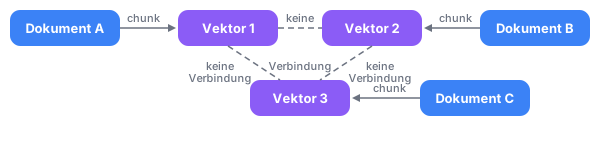
The vectors exist in isolation -- the system knows nothing about the relationships between documents.
What Is GraphRAG?
GraphRAG combines two powerful concepts:
- Knowledge Graphs: Structured representation of entities and their relationships
- RAG: Retrieval of relevant information to enrich LLM responses
Microsoft released GraphRAG as an open-source project in 2024. The approach automatically extracts a knowledge graph from unstructured text and uses it for smarter search.
The GraphRAG Advantage
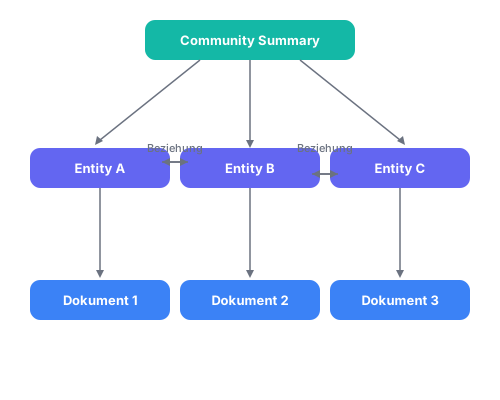
Now the system understands not just the content but also the structure of your data.
The GraphRAG Architecture
Phase 1: Indexing
GraphRAG processes your documents in several steps:
1. Text Unit Segmentation
The entire text corpus is divided into manageable units -- similar to classic RAG, but with the goal of preserving coherent information.
2. Entity & Relationship Extraction
An LLM analyzes each text and extracts:
- Entities: People, organizations, concepts, products
- Relationships: How entities are connected to each other
- Claims: Important statements and facts
# Beispiel: Extrahierte Daten
{
    "entities": [
        {"name": "Acme Corp", "type": "ORGANIZATION"},
        {"name": "John Smith", "type": "PERSON"},
        {"name": "Project Alpha", "type": "PROJECT"}
    ],
    "relationships": [
        {"source": "John Smith", "target": "Acme Corp", "type": "WORKS_AT"},
        {"source": "John Smith", "target": "Project Alpha", "type": "LEADS"}
    ]
}
3. Community Detection
GraphRAG uses the Leiden algorithm to identify groups of closely connected entities. These "communities" represent thematic clusters in your data.
4. Hierarchical Summaries
For each community, an LLM creates a summary. These summaries are hierarchical -- from very granular (Level 0) to very abstract (higher levels).
The Pipeline Visualized

Understanding Search Modes
GraphRAG offers different search modes for different use cases:
Global Search
Purpose: Overarching questions that span the entire document corpus.
Examples:
- "What are the main themes in these documents?"
- "What trends emerge across all quarterly reports?"
- "Summarize the most important strategic decisions."
How it works:
- Uses community summaries
- Aggregates information from different clusters
- Synthesizes a comprehensive answer
# Global Search Beispiel
import asyncio
import pandas as pd
from pathlib import Path
from graphrag.config.load_config import load_config
import graphrag.api as api

async def global_query():
    project_dir = Path("./my-project")
    config = load_config(project_dir)

    # Index-Dateien laden
    output = project_dir / "output"
    entities = pd.read_parquet(output / "entities.parquet")
    communities = pd.read_parquet(output / "communities.parquet")
    community_reports = pd.read_parquet(output / "community_reports.parquet")

    response, context = await api.global_search(
        config=config,
        entities=entities,
        communities=communities,
        community_reports=community_reports,
        community_level=2,  # Abstraktionsgrad
        response_type="Multiple Paragraphs",
        query="Was sind die Hauptthemen der Dokumentation?"
    )

    return response

result = asyncio.run(global_query())
print(result)
Local Search
Purpose: Specific questions about particular entities and their direct relationships.
Examples:
- "What do we know about Customer XYZ?"
- "Which projects does Person A lead?"
- "How is Product B connected to other products?"
How it works:
- Identifies relevant entities in the question
- Traverses the graph from these entities
- Collects connected information
- Generates a focused answer
# Local Search Beispiel
from graphrag.api import local_search

async def local_query():
    # ... config und Daten laden wie oben ...

    response, context = await local_search(
        config=config,
        entities=entities,
        communities=communities,
        community_reports=community_reports,
        text_units=text_units,
        relationships=relationships,
        community_level=2,
        query="Wer ist Max Mustermann und was sind seine Hauptprojekte?"
    )

    return response
When to Use Which Mode?
| Question Type | Mode | Example |
|---|---|---|
| Overview/Trends | Global | "Main themes of the reports?" |
| Specific Entity | Local | "Details on Project X?" |
| Comparisons | Global | "Differences Q1 vs Q2?" |
| Relationships | Local | "Who works with whom?" |
Practical Implementation
Installation
# Python-Umgebung erstellen
python -m venv graphrag-env
source graphrag-env/bin/activate

# GraphRAG installieren
pip install graphrag

# Projekt initialisieren
graphrag init --root ./my-project
Configuration
GraphRAG creates a settings.yaml with important settings:
# settings.yaml
llm:
  type: openai_chat
  model: gpt-4o-mini  # Für kostenbewusste Indexierung
  api_key: ${OPENAI_API_KEY}

embeddings:
  type: openai_embedding
  model: text-embedding-3-small

chunks:
  size: 1200
  overlap: 100

entity_extraction:
  max_gleanings: 1  # Reduziert LLM-Calls

community_reports:
  max_length: 2000
Indexing Documents
# Dokumente in ./my-project/input/ ablegen
cp meine-dokumente/*.txt ./my-project/input/

# Indexierung starten
graphrag index --root ./my-projectImportant: GraphRAG consumes many LLM tokens! Start with small test data.
Comparison: GraphRAG vs. Classic RAG
Performance Differences
| Aspect | Classic RAG | GraphRAG |
|---|---|---|
| Simple factual questions | Very good | Good |
| Complex synthesis questions | Weak | Very good |
| Relationship questions | Weak | Very good |
| Indexing time | Fast | Slow |
| Indexing cost | Low | High |
| Query cost | Low | Medium |
Cost Considerations
GraphRAG is more expensive for indexing because it requires LLM calls for entity extraction, relationship extraction, and community summarization.
Rules of thumb:
- 100 pages of text ≈ $1-5 indexing cost (with GPT-4o-mini)
- Queries are cheaper (only summaries are loaded)
When to Choose GraphRAG?
GraphRAG is ideal for:
- Document corpora with many relationships
- Questions that require synthesis
- Applications where quality matters more than cost
Classic RAG is sufficient for:
- Simple FAQ systems
- Documentation with few cross-references
- Cost-sensitive applications
Best Practices
1. Optimal Document Size
- Too small chunks: Context is lost
- Too large chunks: Imprecise extraction
- Recommendation: 1000-1500 tokens per chunk
2. Choosing Community Level
| Level | Description | Use Case |
|---|---|---|
| 0 | Very granular | Detail questions |
| 1 | Medium granularity | Local Search |
| 2 | Abstract | Global Search |
| 3+ | Very abstract | Overview questions |
Tip: Start with Level 2 for Global Search, Level 1 for Local Search.
3. Keeping Costs Under Control
# Kostenoptimierte Konfiguration
llm:
  model: gpt-4o-mini  # Statt gpt-4o

entity_extraction:
  max_gleanings: 0  # Reduziert Extraktionsrunden

community_reports:
  max_length: 1500  # Kürzere Zusammenfassungen
4. Leveraging Caching
# Parquet-Dateien sind dein Cache
# Lade sie einmal und nutze sie für viele Abfragen
entities = pd.read_parquet("entities.parquet")  # Einmal laden
# Dann für alle Queries wiederverwenden
Conclusion
GraphRAG is a powerful tool for applications that go beyond simple factual questions. The combination of knowledge graph and RAG enables:
- Better understanding of relationships
- More reliable answers to complex questions
- Reduced hallucinations through structured data
My recommendation: Start with a small test dataset, understand the costs, and then scale. GraphRAG is particularly valuable for internal knowledge bases, research documents, and complex corporate archives.
The next step? Combine GraphRAG with Agentic RAG for even smarter systems that can plan autonomously and work iteratively.
Further reading:
- Introduction to RAG and the CRAG Architecture
- RAG in Production: From PoC to Enterprise System
- Dive into RAG: Build Your Own Intelligent Q&A System
Looking to deploy GraphRAG or knowledge graphs in your organization? Contact me for a free consultation.