
AWS Lambda with Laravel: Serverless PHP in Practice

Photo by Jakub Żerdzicki on Unsplash
Serverless computing promises less infrastructure management, automatic scaling, and pay-per-use billing. But can this also work with PHP and Laravel? The answer is: Yes, and very well!
With Laravel Vapor or the Bref framework, you can deploy your Laravel applications on AWS Lambda and benefit from all the advantages of serverless architecture.
In this article, I will show you:
- How to prepare Laravel for AWS Lambda
- Deployment with Laravel Vapor vs. Bref
- How to optimize cold starts
- Best practices for production-ready serverless Laravel apps
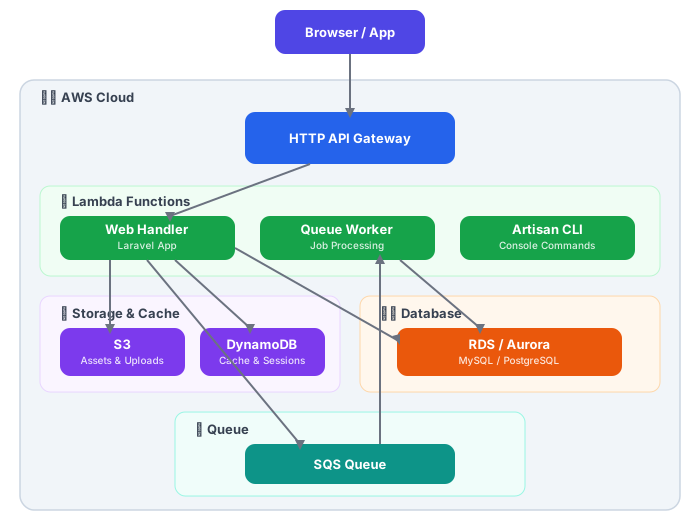
Why Serverless for Laravel?
Advantages
| Aspect | Traditional (EC2/ECS) | Serverless (Lambda) |
|---|---|---|
| Scaling | Manual/Auto-Scaling Rules | Automatic, instant |
| Idle Costs | 24/7 Server Costs | No costs |
| Maintenance | OS Updates, Security Patches | Managed by AWS |
| Deployment | Container/Server Config | Code Upload |
| Startup | Seconds (Container) | Cold Start: 100-500ms |
When to Go Serverless?
Well suited:
- APIs with variable traffic
- Background jobs and queue workers
- Websites with unpredictable traffic
- Microservices
Less suited:
- WebSocket connections (long-running)
- Applications with constant, high traffic
- Legacy code with many filesystem operations
Option 1: Laravel Vapor
Laravel Vapor is the official serverless platform from Laravel. It abstracts the AWS complexity and provides a seamless deployment experience.
Setup
# Vapor CLI installieren
composer global require laravel/vapor-cli

# In Ihrem Laravel-Projekt
composer require laravel/vapor

# Mit Vapor-Account verbinden
vapor login
Initialize Project
vapor initThis creates a vapor.yml configuration:
# vapor.yml
id: 12345
name: meine-app
environments:
  production:
    memory: 1024
    cli-memory: 512
    runtime: 'php-8.3:al2'
    build:
      - 'composer install --no-dev'
      - 'npm ci && npm run build'
    deploy:
      - 'php artisan migrate --force'

  staging:
    memory: 512
    runtime: 'php-8.3:al2'
    database: my-staging-db
Database Configuration
Vapor uses RDS (MySQL/PostgreSQL) or Aurora Serverless:
# vapor.yml
environments:
  production:
    database: my-production-db

databases:
  my-production-db:
    engine: 'mysql-8.0'
    class: 'db.t3.micro'
    storage: 20
    autoscaling: true
Queue Worker as Lambda
# vapor.yml
environments:
  production:
    queues:
      - default
      - notifications
    queue-memory: 512
    queue-timeout: 60
Deployment
# Staging deployen
vapor deploy staging

# Production deployen
vapor deploy production
Vapor-Specific Adjustments
// config/filesystems.php
'disks' => [
    's3' => [
        'driver' => 's3',
        'key' => env('AWS_ACCESS_KEY_ID'),
        'secret' => env('AWS_SECRET_ACCESS_KEY'),
        'region' => env('AWS_DEFAULT_REGION'),
        'bucket' => env('AWS_BUCKET'),
    ],
],

// Vapor nutzt S3 für File-Uploads
// /tmp ist das einzige beschreibbare Verzeichnis in Lambda
// app/Providers/AppServiceProvider.php
public function boot(): void
{
// Assets von CloudFront laden wenn in Vapor
if ($this->app->environment('production') && isset($_ENV['VAPOR_ARTIFACT_NAME'])) {
URL::forceRootUrl(config('app.asset_url'));
}
}Option 2: Bref (Open Source Alternative)
Bref is an open-source framework for PHP on Lambda that offers more control:
Installation
composer require bref/bref bref/laravel-bridge

# Serverless Framework installieren
npm install -g serverless
Configuration
# serverless.yml
service: meine-laravel-app

provider:
  name: aws
  region: eu-central-1
  runtime: provided.al2
  environment:
    APP_ENV: production
    APP_DEBUG: false
    LOG_CHANNEL: stderr
    SESSION_DRIVER: cookie
    CACHE_DRIVER: dynamodb
    QUEUE_CONNECTION: sqs

plugins:
  - ./vendor/bref/bref

functions:
  web:
    handler: public/index.php
    runtime: php-83-fpm
    timeout: 28
    memorySize: 1024
    events:
      - httpApi: '*'

  artisan:
    handler: artisan
    runtime: php-83-console
    timeout: 720
    memorySize: 512

  queue:
    handler: Bref\LaravelBridge\Queue\QueueHandler
    runtime: php-83
    timeout: 60
    memorySize: 512
    events:
      - sqs:
          arn: !GetAtt JobsQueue.Arn
          batchSize: 1

resources:
  Resources:
    JobsQueue:
      Type: AWS::SQS::Queue
      Properties:
        QueueName: ${self:service}-jobs
        VisibilityTimeout: 120

    CacheTable:
      Type: AWS::DynamoDB::Table
      Properties:
        TableName: ${self:service}-cache
        AttributeDefinitions:
          - AttributeName: key
            AttributeType: S
        KeySchema:
          - AttributeName: key
            KeyType: HASH
        BillingMode: PAY_PER_REQUEST
Adapting Laravel for Bref
// config/cache.php
'dynamodb' => [
    'driver' => 'dynamodb',
    'key' => env('AWS_ACCESS_KEY_ID'),
    'secret' => env('AWS_SECRET_ACCESS_KEY'),
    'region' => env('AWS_DEFAULT_REGION', 'eu-central-1'),
    'table' => env('DYNAMODB_CACHE_TABLE', 'cache'),
    'endpoint' => env('DYNAMODB_ENDPOINT'),
],
// config/session.php
// Für Stateless APIs: Token-basierte Auth nutzen
// Für Sessions: Cookie-Driver oder DynamoDB
'driver' => env('SESSION_DRIVER', 'cookie'),Deployment with Bref
# Deployment
serverless deploy

# Nur Code aktualisieren (schneller)
serverless deploy function -f web

# Logs anzeigen
serverless logs -f web -t

# Artisan-Befehle ausführen
vendor/bin/bref cli meine-laravel-app-production-artisan -- migrate --force
Optimizing Cold Starts
Cold starts are the biggest challenge with serverless PHP. Here are proven strategies:
1. Opcache Preloading
// config/opcache-preload.php
<?php
require_once __DIR__ . '/../vendor/autoload.php';

// Framework-Klassen vorladen
$preloadClasses = [
    \Illuminate\Foundation\Application::class,
    \Illuminate\Http\Request::class,
    \Illuminate\Http\Response::class,
    \Illuminate\Routing\Router::class,
    \Illuminate\Database\Eloquent\Model::class,
];

foreach ($preloadClasses as $class) {
    if (class_exists($class)) {
        // Klasse wird durch class_exists geladen
    }
}
; php.ini für Lambda (via Layer)
opcache.enable=1
opcache.enable_cli=1
opcache.preload=/var/task/config/opcache-preload.php
opcache.preload_user=root2. Config and Route Caching
# In Ihrem Build-Prozess
php artisan config:cache
php artisan route:cache
php artisan view:cache
php artisan event:cache
# vapor.yml
environments:
production:
build:
- 'composer install --no-dev --optimize-autoloader'
- 'php artisan config:cache'
- 'php artisan route:cache'
- 'php artisan view:cache'3. Reducing Package Size
// composer.json
{
    "autoload": {
        "classmap": [
            "database/factories",
            "database/seeders"
        ],
        "psr-4": {
            "App\\": "app/"
        },
        "exclude-from-classmap": [
            "tests/"
        ]
    }
}
# Development-Dependencies entfernen
composer install --no-dev --optimize-autoloader
# Unnötige Dateien entfernen
rm -rf tests/ .git/ node_modules/4. Provisioned Concurrency (paid)
# serverless.yml
functions:
  web:
    provisionedConcurrency: 5  # 5 warme Instanzen
5. Lazy Loading Services
// app/Providers/AppServiceProvider.php
public function register(): void
{
    // Services erst laden wenn benötigt
    $this->app->singleton(HeavyService::class, function ($app) {
        return new HeavyService();
    });
}
Practical Examples
API Endpoint with Response Caching
// app/Http/Controllers/Api/ProductController.php
namespace App\Http\Controllers\Api;

use App\Models\Product;
use Illuminate\Http\JsonResponse;
use Illuminate\Support\Facades\Cache;

class ProductController extends Controller
{
    public function index(): JsonResponse
    {
        // Cache für 5 Minuten (Lambda-freundlich)
        $products = Cache::remember('products.all', 300, function () {
            return Product::with(['category', 'images'])
                ->active()
                ->orderBy('created_at', 'desc')
                ->limit(100)
                ->get();
        });

        return response()->json([
            'data' => $products,
            'meta' => [
                'cached_at' => now()->toIso8601String(),
            ]
        ]);
    }

    public function show(string $slug): JsonResponse
    {
        $cacheKey = "products.{$slug}";

        $product = Cache::remember($cacheKey, 300, function () use ($slug) {
            return Product::with(['category', 'images', 'reviews'])
                ->where('slug', $slug)
                ->firstOrFail();
        });

        return response()->json(['data' => $product]);
    }
}
Queue Job for Background Processing
// app/Jobs/ProcessImageUpload.php
namespace App\Jobs;

use App\Models\Image;
use Illuminate\Bus\Queueable;
use Illuminate\Contracts\Queue\ShouldQueue;
use Illuminate\Foundation\Bus\Dispatchable;
use Illuminate\Queue\InteractsWithQueue;
use Illuminate\Queue\SerializesModels;
use Illuminate\Support\Facades\Storage;
use Intervention\Image\Facades\Image as ImageProcessor;

class ProcessImageUpload implements ShouldQueue
{
    use Dispatchable, InteractsWithQueue, Queueable, SerializesModels;

    public int $tries = 3;
    public int $timeout = 60;

    public function __construct(
        public Image $image,
        public string $s3Key
    ) {}

    public function handle(): void
    {
        // Bild von S3 laden
        $originalImage = Storage::disk('s3')->get($this->s3Key);

        // In /tmp speichern (einziger beschreibbarer Ort in Lambda)
        $tempPath = '/tmp/' . basename($this->s3Key);
        file_put_contents($tempPath, $originalImage);

        // Thumbnails erstellen
        $sizes = [
            'thumb' => [150, 150],
            'medium' => [600, 400],
            'large' => [1200, 800],
        ];

        foreach ($sizes as $name => [$width, $height]) {
            $resized = ImageProcessor::make($tempPath)
                ->fit($width, $height)
                ->encode('webp', 85);

            $newKey = str_replace(
                basename($this->s3Key),
                "{$name}_" . pathinfo($this->s3Key, PATHINFO_FILENAME) . '.webp',
                $this->s3Key
            );

            Storage::disk('s3')->put($newKey, $resized->getEncoded());
        }

        // Original als WebP speichern
        $webpImage = ImageProcessor::make($tempPath)
            ->encode('webp', 90);

        Storage::disk('s3')->put(
            str_replace(
                '.' . pathinfo($this->s3Key, PATHINFO_EXTENSION),
                '.webp',
                $this->s3Key
            ),
            $webpImage->getEncoded()
        );

        // Temp-Datei aufräumen
        unlink($tempPath);

        // Model aktualisieren
        $this->image->update(['processed' => true]);
    }

    public function failed(\Throwable $exception): void
    {
        $this->image->update([
            'processed' => false,
            'error' => $exception->getMessage(),
        ]);
    }
}
Scheduled Tasks in Serverless
// app/Console/Kernel.php
protected function schedule(Schedule $schedule): void
{
    // Für Vapor/Bref: CloudWatch Events triggern diese
    $schedule->command('reports:daily')
        ->dailyAt('06:00')
        ->timezone('Europe/Berlin');

    $schedule->command('cache:prune-stale-tags')
        ->hourly();

    // Cleanup-Job (wichtig für /tmp in Lambda)
    $schedule->call(function () {
        $files = glob('/tmp/*');
        foreach ($files as $file) {
            if (is_file($file) && time() - filemtime($file) > 3600) {
                unlink($file);
            }
        }
    })->hourly();
}
# serverless.yml - Scheduled Events
functions:
scheduler:
handler: artisan
runtime: php-83-console
events:
- schedule:
rate: rate(1 minute)
input:
cli: "schedule:run"Monitoring and Debugging
Configuring CloudWatch Logs
// config/logging.php
'channels' => [
    'stderr' => [
        'driver' => 'monolog',
        'level' => env('LOG_LEVEL', 'debug'),
        'handler' => StreamHandler::class,
        'with' => [
            'stream' => 'php://stderr',
        ],
    ],
],
Custom Metrics
// app/Services/MetricsService.php
namespace App\Services;

use Aws\CloudWatch\CloudWatchClient;

class MetricsService
{
    private CloudWatchClient $client;

    public function __construct()
    {
        $this->client = new CloudWatchClient([
            'region' => config('services.aws.region'),
            'version' => 'latest',
        ]);
    }

    public function recordLatency(string $operation, float $milliseconds): void
    {
        $this->client->putMetricData([
            'Namespace' => 'MyApp/Performance',
            'MetricData' => [
                [
                    'MetricName' => 'OperationLatency',
                    'Dimensions' => [
                        [
                            'Name' => 'Operation',
                            'Value' => $operation,
                        ],
                    ],
                    'Value' => $milliseconds,
                    'Unit' => 'Milliseconds',
                ],
            ],
        ]);
    }

    public function recordColdStart(): void
    {
        $this->client->putMetricData([
            'Namespace' => 'MyApp/Lambda',
            'MetricData' => [
                [
                    'MetricName' => 'ColdStart',
                    'Value' => 1,
                    'Unit' => 'Count',
                ],
            ],
        ]);
    }
}
Request Tracing with X-Ray
// app/Http/Middleware/XRayMiddleware.php
namespace App\Http\Middleware;

use Closure;
use Illuminate\Http\Request;

class XRayMiddleware
{
    public function handle(Request $request, Closure $next)
    {
        $traceId = $request->header('X-Amzn-Trace-Id');

        if ($traceId) {
            // Trace-ID für Logs verfügbar machen
            config(['app.trace_id' => $traceId]);
        }

        return $next($request);
    }
}
Cost Overview
Lambda Costs (eu-central-1)
| Resource | Price |
|---|---|
| Requests | $0.20 / 1M Requests |
| Duration (1GB) | $0.0000166667 / GB-second |
| Free Tier | 1M Requests + 400,000 GB-seconds / month |
Example Calculation
API with 100,000 Requests/Day:
- 3M Requests/month: ~$0.60
- Duration (avg 200ms, 1GB): ~$10
- API Gateway: ~$3.50
- Total: ~$14/month
Comparison: EC2 t3.small 24/7 = ~$15/month (without auto-scaling)
Conclusion
Laravel on AWS Lambda is production-ready and offers real advantages:
- Cost efficiency with variable traffic
- No server maintenance
- Automatic scaling
- Pay-per-use
The choice between Vapor and Bref depends on your requirements:
| Criterion | Vapor | Bref |
|---|---|---|
| Setup | Easier | More control |
| Cost | $39+/month + AWS | AWS only |
| Support | Official | Community |
| Customization | Limited | Flexible |
For most Laravel projects, I recommend Vapor due to its seamless integration. For more complex setups or cost sensitivity, Bref is the better choice.
Planning to migrate your Laravel application to AWS Lambda? Contact me for an architecture consultation.